
How Big Should a QR Code Be? QR Code Size Guide 2026
Last updated Nov 1, 2026
On this page
- The short version
- What decides the size: squares, printer and distance
- The smallest print for common content
- The 10:1 distance rule, and what it assumes
- Sizes by placement, with where the reader stands
- QR code size on screens: pixels per square
- What eight guides say the minimum is, side by side
- The white margin scales with the code
- How to size and test a QR code with QRCodePrime
- Common QR code size mistakes
- Sources
- Common questions about QR code size
A QR code should be printed at least 2 cm (0.8 inches) wide when it is read in the hand, and about one tenth of the reading distance when it is read from further away, with a white margin four squares wide. Both figures assume a short link. A longer link makes a code with more squares, and every square needs width, so a tagged link or a contact card needs a larger print than a short link.
That is what the sizing guides leave out. Thirteen pages that rank for this question were read on November 1, 2026; every one gives a single minimum and the 10:1 rule, and none computes how the minimum moves with the content. Every size below was computed with the encoder the QR code generator on the homepage uses, the printer figures are the inventor's, and the screen sizes come from a test with this site's own scanner.
The short version
The floor is set by the printer and the number of squares. At 300 dpi, Denso Wave's table gives 0.33 mm per square. A 38 character link is a 37 square code, so its smallest print with the margin is 14.9 mm (0.58 inches); a 117 character tagged link is 57 squares and needs 21.4 mm (0.84 inches). Those are hand-held floors, not sizes to print.
Distance multiplies the floor. The 10:1 rule gives 1.2 inches at arm's length and 12 inches at 10 feet, for a short link. Scale it by the square count, then settle the size with a test print.
On screens, two pixels per square reads in a clean file; use four. This site's scanner read a 37 square code at 90 pixels wide.
What decides the size: squares, printer and distance
Three things decide the size, in this order: how many squares the code has, how small the printer can make one square, and how far away the camera is. Denso Wave, the company that invented the code, describes the first two on its own pages.
The square count comes from the content. "Each higher version number comprises 4 additional modules per side," the version page says, from 21 squares at version 1 to 177 at version 40, and "as the amount of data increases, more modules are required to comprise QR Code, resulting in larger QR Code symbols." At error correction level H, the level the generator uses everywhere, the 29 square version holds 24 characters, the 37 square version 44, the 57 square version 119 and the 81 square version 250, measured on November 1, 2026. The QR code size chart lists all 40 versions with their floors, and the QR code character limit guide covers capacity by type.
The printer sets the smallest square. Denso Wave's module size page gives a 300 dpi printer at four dots per square a 0.33 mm square and a 600 dpi printer 0.17 mm, adds that "DENSO WAVE recommends for stable operations that each module is made up of 4 or more dots," and gives the advice every size guide should quote: "It is recommended that QR Code symbols be printed as large as possible within the available printing area." Distance works on the camera: a square that is far away covers fewer pixels of the sensor, which is why the rest of this page counts squares.
The smallest print for common content
The smallest honest print is the square count plus eight for the margin, multiplied by the printer's square size. The table was built on November 1, 2026 by encoding each example with the qrcode-generator library at level H and applying Denso Wave's 300 dpi and 600 dpi figures with the margin. The last column shows a code forced into a 1 inch slot, margin included: the squares shrink with the content.
| What is inside the code | Characters | Squares per side | Smallest print at 300 dpi, with margin | At 600 dpi | Square size in a 1 inch slot |
|---|---|---|---|---|---|
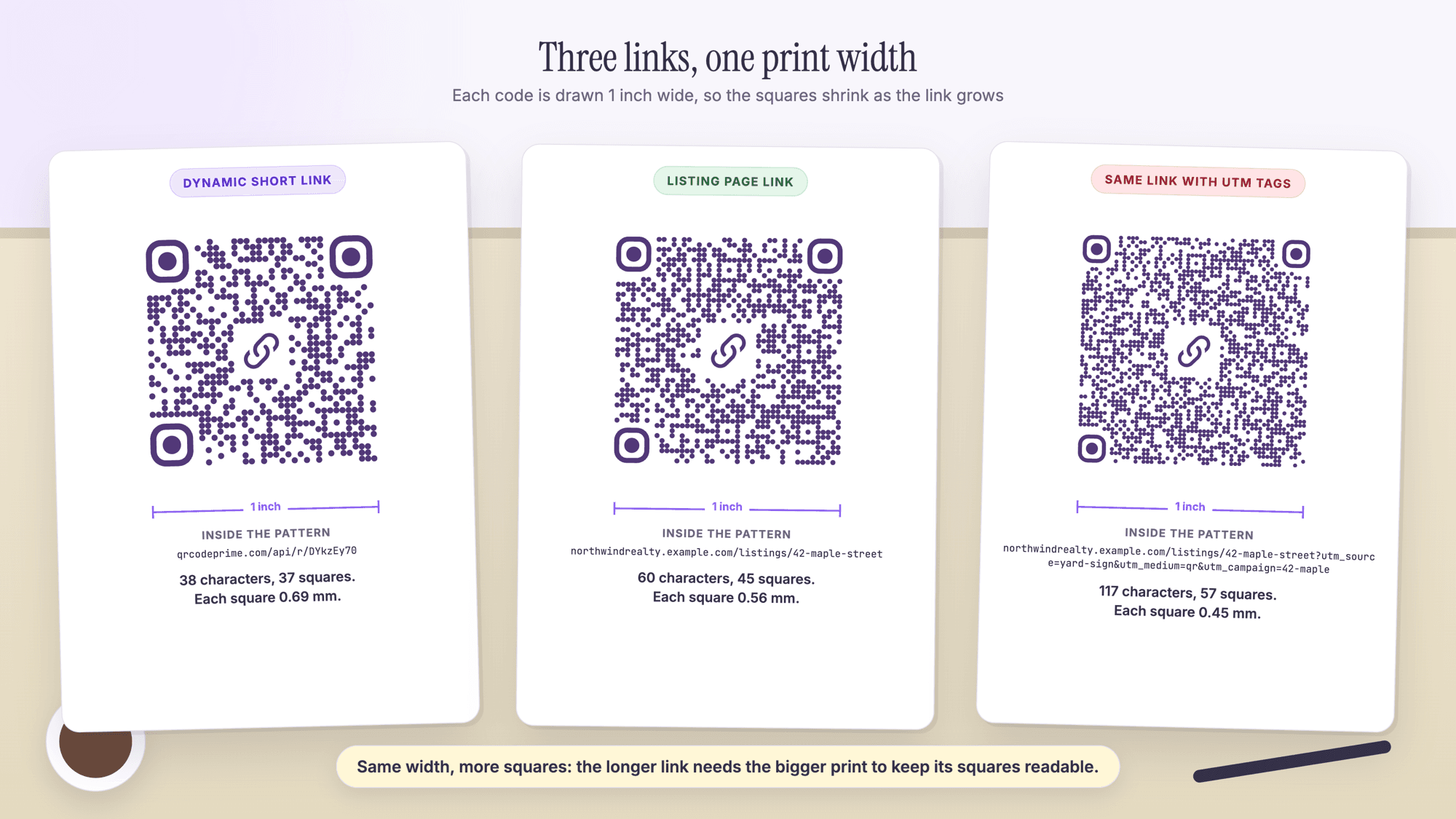
| QRCodePrime dynamic short link | 38 | 37 | 14.9 mm (0.58 in) | 7.7 mm (0.30 in) | 0.56 mm |
| WiFi code, 12 character password | 45 | 41 | 16.2 mm (0.64 in) | 8.3 mm (0.33 in) | 0.52 mm |
| A page address, 60 characters | 60 | 45 | 17.5 mm (0.69 in) | 9.0 mm (0.35 in) | 0.48 mm |
| The same page address with three UTM tags | 117 | 57 | 21.4 mm (0.84 in) | 11.1 mm (0.44 in) | 0.39 mm |
| vCard with seven fields | 221 | 81 | 29.4 mm (1.16 in) | 15.1 mm (0.59 in) | 0.29 mm |
The 2 cm minimum the guides repeat is right for a short link and wrong for a vCard, whose floor is already 2.9 cm at 300 dpi. And the dynamic short link is the smallest code a long destination can have, because the printed pattern holds the 38 character link and the long address lives behind it; the free dynamic QR code generator makes one, and every free account includes 10 dynamic QR codes, free for life, with scan analytics, no credit card required and no watermarks.
The 10:1 distance rule, and what it assumes
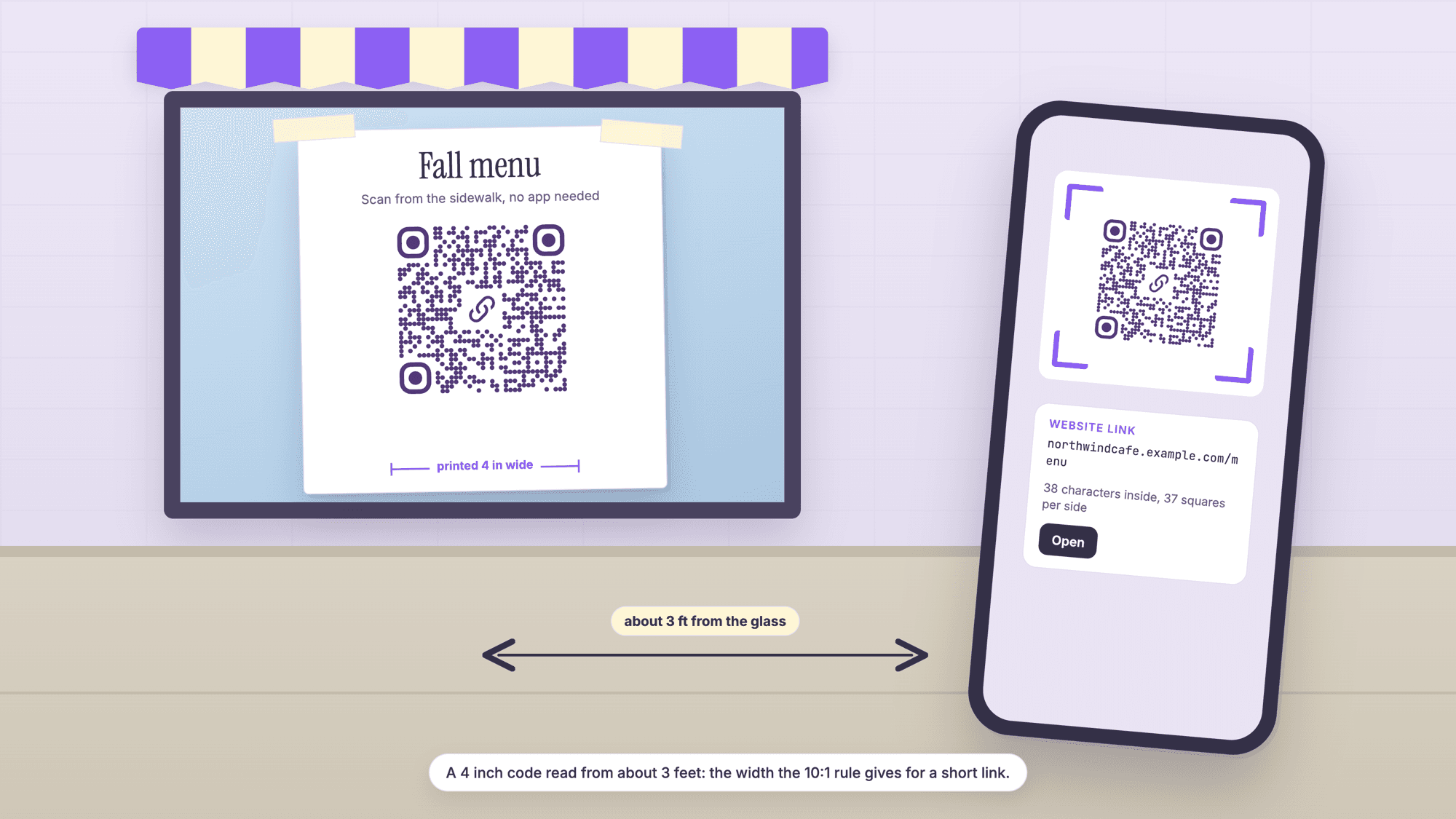
The 10:1 rule says the width of the code should be about one tenth of the distance it is read from: 2 cm at 20 cm. Every readable page in the set states it: Bitly's version is "The QR Code distance-to-size ratio is about 10:1," and Blinq's is "The ideal scanning size to distance ratio is 10:1." None says what code the rule is for, and that matters, because the camera reads squares, not codes.
Read as a square size, the rule says that a 2 cm code at 20 cm, if it is a 29 square short link, has squares of 0.69 mm, each spanning 1/290 of the distance. A 57 square tagged link at the same 2 cm has squares of 0.35 mm, half the size, so it needs twice the width at the same distance. The table applies that: width equals distance divided by 10, multiplied by the square count divided by 29.
| Squares per side (what it usually holds) | 12 in, in the hand | 3 ft, a table or counter | 5 ft, a shop poster | 10 ft, a window from the sidewalk |
|---|---|---|---|---|
| 29 (a link under 25 characters) | 1.2 in | 3.6 in | 6 in | 12 in |
| 37 (a dynamic or short link) | 1.5 in | 4.6 in | 7.7 in | 15 in |
| 45 (a page address) | 1.9 in | 5.6 in | 9.3 in | 19 in |
| 57 (a tagged link or a form link) | 2.4 in | 7.1 in | 12 in | 24 in |
These are starting sizes for a test print, not floors. The rule is conservative: the same guides that state it also list 4 to 6 cm for a poster read from a few feet away, which the rule would put at 9 to 18 cm, and a modern phone usually reads a smaller code than the rule asks for. The final size comes from a proof scanned from where it will live, as the guide to testing a QR code before printing describes.
Sizes by placement, with where the reader stands
The right size follows from who scans the code and from how far. The starting sizes are for a 37 square code, a short or dynamic link; add about half again for a tagged link, and read a vCard only up close.
| Placement | Who scans it, from where | Start the test print at |
|---|---|---|
| Business card or name badge | The person holding it, 10 to 12 inches | 1 inch (25 mm) for a link, 1.25 inches (32 mm) for a vCard |
| Flyer or mailer | In the hand, 12 to 15 inches | 1 to 1.25 inches (25 to 32 mm) |
| Menu or table tent | A seated guest, about 2 feet | 1.5 to 2 inches (38 to 50 mm) |
| Counter sign | A standing customer, 2 to 3 feet | 2 to 3 inches (50 to 75 mm) |
| Poster inside a shop | 3 to 5 feet | 4 to 6 inches (100 to 150 mm) |
| Window, read from the sidewalk | 5 to 10 feet, through glass | 6 to 12 inches (150 to 300 mm); test after dark |
| Yard sign or A-frame | From the sidewalk and a parked car, 5 to 15 feet | As large as the panel allows, 6 inches (150 mm) and up |
The guide to QR codes on business cards, the QR code menu guide and the real estate guide have the layouts for cards, tents and sign panels; the guide to address QR codes and the guide to Google Maps QR codes show how the link format moves the square count; the restaurants page and the real estate page list sizes by placement.
QR code size on screens: pixels per square
On a screen the unit is pixels per square, because a 37 square code and a 57 square code at the same pixel width give the camera different squares. One ranking page explains why: "Smartphone cameras need a minimum number of pixels to resolve the individual modules (the small squares) in a QR code." None measures it.
So this site's scanner was measured. On November 1, 2026 a 37 square code and a 57 square code were drawn as clean PNG files at one to eight pixels per square, each with its margin, and uploaded to the QR code scanner page. At two pixels per square and above every file read: the 37 square code at 90 pixels wide and the 57 square code at 130. At one pixel per square the 37 square code did not read and the 57 square code did, a coin toss. A clean file is the best case, since a camera pointed at a screen adds blur, glare and the screen's own pixel grid, so use at least four pixels per square: 180 pixels for a 37 square code and 260 for a 57 square code in an email signature, six per square (270 and 390) on a web page, and eight (360 and 520) on a conference screen.
The PNG the generator downloads is drawn at three times the preview size; the SVG and the PDF are vector files with no pixel size at all, which is why they are the files to send to a printer. The no sign-up generator page describes the three downloads.
What eight guides say the minimum is, side by side
The guides do not agree, and no page in the set says so. Read on November 1, 2026, in each page's own words:
| Page | What it states as the minimum |
|---|---|
| Uniqode | "The minimum size for a QR Code is 2x2cm for arm's length scanning." |
| Bitly | "a QR Code should be at least 2 cm x 2 cm (approximately 0.8 in x 0.8 in) for most QR Code scanners to read." |
| QR Code Generator | "For close-up scanning, QR Codes should be at least 2 x 2 cm (0.8 x 0.8 in) to remain readable." |
| QR Planet | "We recommend a size of 2 x 2 cm for a QR Code" |
| Scanova | "For most cases, stick with 1 x 1 inch (2.5 x 2.5 cm)" and "the smallest usable size is about 1 cm x 1 cm" |
| Sticker Genius | "the minimum recommended print size for a QR code is 1 inch by 1 inch" |
| QR Tiger | "The minimum size for QR codes should be at least 1.2 inches" |
| QRKit | "each module should be at least about 1 mm in print, with 2 mm the comfortable size for reliable scanning" |
They differ because each answers a different question: 1 cm is a floor on a good printer, 2 cm is a short link in the hand, 1.2 inches leaves room for a longer link, and QRKit's figure is the only one stated per square, the honest unit. A 1 mm square makes a 29 square code 3.7 cm wide with its margin and a 57 square code 6.5 cm; one number for every code cannot be right.
The white margin scales with the code
The margin, or quiet zone, is four squares of white on every side, so it scales with the code: a 1 inch code with 37 squares needs a 2.8 mm (0.11 inch) margin, and the same code at 4 inches needs 11 mm. Denso Wave states the requirement in one line: "QR Code requires a four-module wide margin at all sides of a symbol."
The SVG the generator downloads carries a white margin of 7 percent of the code's width plus whatever space is left from centering the pattern, which depends on the version: for the 45 and 57 square codes on this page it comes to 7 and 8.5 squares, but for a 37 square code it is about 2.6, under the four the specification asks for. So place the code on white, leave extra space around the file in the layout, and never crop it to the black pattern; cropping is one of the fixes in the QR code not scanning guide.
How to size and test a QR code with QRCodePrime
Step 1. Shorten what goes in. A short link on your own domain, or a dynamic code, keeps the square count at 37. Make a static code on the URL QR code generator or the type page for a WiFi, vCard or text code.
Step 2. Download the SVG for print, the PNG for screens. The SVG and the PDF scale to any width without blurring.
Step 3. Set the width from the tables above. Take the floor for the content, scale it for the distance with the 10:1 table, and give the margin four squares of white in the layout.
Step 4. Print one proof at the final size on the final stock. Scan it with an iPhone and an Android phone from the real distance in the real light.
Step 5. Read the proof with the online scanner. Upload a photo of the print to the online QR scanner; it shows the exact address inside the code and labels the link type.
If a code is printed too small the fix is a reprint, and if the destination has to change as well, the guide to editing a QR code after it is printed explains what a dynamic code can do. On QRCodePrime, static QR codes are unlimited and free with no account, and every free account includes 10 dynamic QR codes, free for life, with scan analytics. No credit card required, no watermarks, and no ads on the site or on the redirect.
Common QR code size mistakes
One size for every code. A 2 cm code is fine for a short link and too small for a vCard. Count the squares, or shorten the content.
Cropping the margin to fit. The four square margin is part of the code. A design that cuts into it fails the scan.
A long tracked link where a short one would do. Three UTM tags turn a 45 square code into a 57 square one. Put the tags behind a dynamic code or a short link.
Sources
- Denso Wave: Point for setting the module size (printer table, print as large as possible)
- Denso Wave: Point for determining the code area (the four module margin)
- Denso Wave: Information capacity and versions of QR Code
- Uniqode: QR Code Size Guide (read November 1, 2026)
- Bitly: What's the Minimum Size for a QR Code? (read November 1, 2026)
- QR Code Generator: QR Code Minimum Size Guidelines (read November 1, 2026)
- Scanova: Minimum QR Code Size (read November 1, 2026)
- QR Tiger: QR Code Size (read November 1, 2026)
- Sticker Genius: What's the Minimum QR Code Print Size? (read November 1, 2026)
- QRKit: QR Code Size Chart (read November 1, 2026)
- QR Planet: What is the minimum size of a QR Code? (read November 1, 2026)
- Blinq: What size should a QR code be? (read November 1, 2026)
- QR Insights: QR Code Size Guide (read November 1, 2026)
Common questions about QR code size
How big should a QR code be on a business card?▾
Start at 1 inch (25 mm) for a link and 1.25 inches (32 mm) for a vCard, read from about 12 inches. The computed floor at 300 dpi is 14.9 mm (0.58 inches) for a 37 square short link and 29.4 mm (1.16 inches) for a seven field vCard of 221 characters, margin included. Scan a printed proof before ordering the run.
What is the minimum size of a QR code?▾
There is no single minimum; it depends on the number of squares and the printer. At 300 dpi, Denso Wave's 0.33 mm per square gives 14.9 mm (0.58 inches) for a 37 square short link and 21.4 mm (0.84 inches) for a 57 square tagged link, both with the four square margin. The 2 cm most guides give is right for a short link in the hand and too small for a contact card.
How big should a QR code be on a poster or a flyer?▾
A flyer is read in the hand, so 1 to 1.25 inches works for a link. A poster is read from a few feet away: by the 10:1 rule a short link read from 5 feet starts at 6 inches, and a tagged link at about 12 inches, because it has twice the squares. Print a proof and scan it from the real spot.
Does a longer URL make the QR code bigger?▾
Yes. A 37 character short link is a 37 square code, a 60 character page address is 45 squares, and the same address with three UTM tags is 57 squares. In a 1 inch slot the squares shrink from 0.56 mm to 0.39 mm, and the computed floor rises from 14.9 mm to 21.4 mm. A dynamic short link keeps the printed code at 37 squares whatever the destination length.
How many pixels should a QR code be on a screen?▾
Count pixels per square. This site's scanner read a clean 37 square code at 2 pixels per square (90 pixels wide with the margin) and a 57 square code at 130 pixels. A camera pointed at a screen does worse than a clean file, so use at least 4 pixels per square: 180 pixels for a 37 square code, 260 for a 57 square code, and 360 or more for a slide shown across a room.
Is there a maximum QR code size?▾
Not in the specification; Denso Wave's advice is to print the code as large as the available area permits. The limit is practical: the camera has to see the whole code with its margin in one frame, so a billboard code read from a moving car is usually replaced by a short address in large type.
Paste the link, download the vector file, and print it at the size the tables give. Static QR codes are unlimited and free with no account. Every free account includes 10 dynamic QR codes, free for life, with scan analytics. No credit card, no watermarks.
Make a QR code and download the SVGPublished by
QRCodePrime Team
Guides on making, printing and scanning QR codes
Published by the team behind the free QRCodePrime generator and scanner. The example codes in our illustrations are real codes made with the generator, numbers are either computed by us or quoted from a source we name, and the sources are linked at the end of each article. Found a mistake? Email hello@qrcodeprime.com and we will fix it.