
QR Code Character Limit: How Much Text Fits
Last updated Sep 13, 2026
On this page
- The short version
- The official maximums
- Why nobody reaches those numbers
- Error correction changes the limit
- The encoding modes, and why lowercase costs you
- What we measured: characters, version, and module count
- The real limit is print size, not the specification
- Limits by QR code type
- What to do when your content is too long
- Signs there is too much data in your code
- Sources
- Common questions about QR code character limits
The published maximum for a QR code is 7,089 digits, 4,296 uppercase alphanumeric characters, or 2,953 bytes of ordinary text, and you will never get near any of them. Those numbers assume the largest symbol in the specification and the weakest error correction setting, which together produce a code so dense that a phone camera struggles to read it off paper. The limit that decides your project is a different one: how many characters you can fit and still print the code small enough to be useful.
This page gives both. The official maximums by character type and error correction level, and the measured relationship between characters, symbol size, and printed width, encoded with the same open source library this site runs on. If you are here because a code will not scan, the short answer is nearly always that there is too much inside it: put a link in the code instead and keep the content on a page. The text QR code generator and the free QR code generator both make static codes with no account and no watermark.
The short version
The absolute ceiling is 2,953 bytes of plain text, at error correction level L, in a version 40 symbol that is 177 modules across.
The ceiling that applies to you is lower, because most generators use stronger error correction. QRCodePrime uses level H, the highest, where the same text limit is 1,273 characters.
The practical limit is lower still. Past about 300 characters the code needs more than an inch of clean print to read reliably, and past about 500 it belongs on a poster.
The fix for long content is always the same: encode a short link and put the content on a page. The code stays small no matter how much sits behind it.
The official maximums
A QR code comes in forty sizes, called versions. Denso Wave, which invented the format, describes the range as version 1 at 21 by 21 modules up to version 40 at 177 by 177, with each step adding four modules to a side. A module is one square in the grid. How much data a given version holds depends on two further things: what kind of characters you are storing, and how much of the symbol is spent on error correction.
We measured the ceilings by encoding progressively longer strings into a version 40 symbol at each error correction level, using the qrcode-generator library the site depends on. These are the results, and they match the published capacity tables.
| Error correction level | Digits only | Uppercase alphanumeric | Ordinary text (bytes) |
|---|---|---|---|
| L, the weakest | 7,089 | 4,296 | 2,953 |
| M, the usual default | 5,596 | 3,391 | 2,331 |
| Q | 3,993 | 2,420 | 1,663 |
| H, the strongest (QRCodePrime) | 3,057 | 1,852 | 1,273 |
There is a fourth character type, kanji, with its own compact mode for Japanese text. Denso Wave lists it alongside the numeric, alphanumeric, and binary types on its capacity page.
Why nobody reaches those numbers
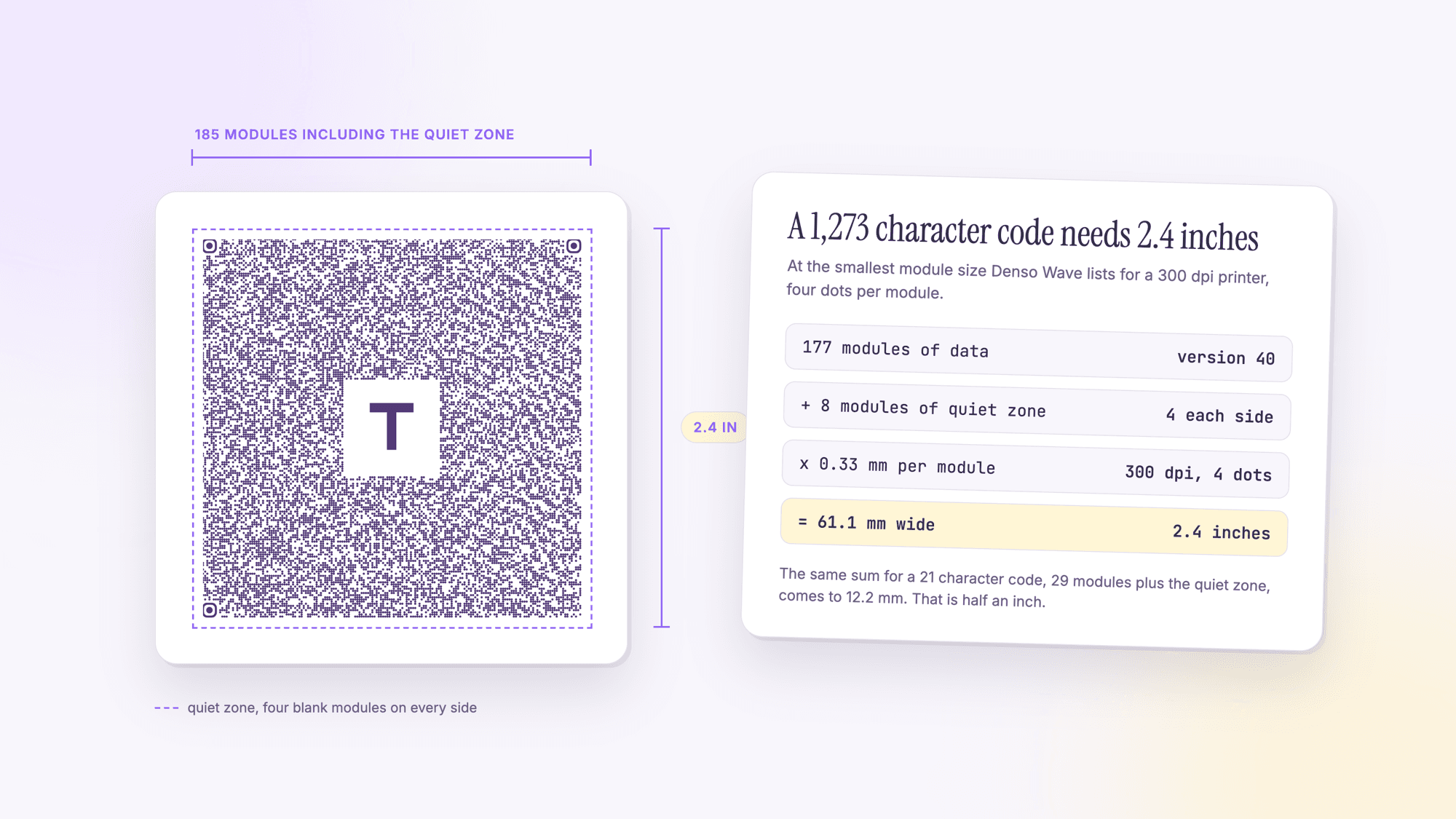
Every one of the figures above describes a version 40 symbol: 177 modules on a side, 31,329 squares in total, before the blank margin around it. Denso Wave's guidance on module size says a 300 dpi printer laying four dots per module produces a module 0.33 mm across, and the company recommends at least four dots per module for stable reading. Do the arithmetic and a version 40 code at that module size is 58.4 mm wide, or 61.1 mm once you add the four module quiet zone the specification requires on every side. That is 2.4 inches of your design given over to one square.
Then there is the camera. A phone has to resolve every one of those 31,329 squares from whatever distance and angle the person happens to hold it. Printing smaller does not reduce the number of squares, it just makes each one closer to the limit of what the lens and sensor can separate. A code that scans perfectly on a bright monitor can fail completely on matte paper at the same width.
So the real ceiling is not a character count at all. It is the point at which the code you need becomes bigger than the space you have.
Error correction changes the limit
QR codes carry redundancy so that a code can still be read when it is scratched, smudged, or partly covered. Denso Wave describes four levels and says level M is the most commonly chosen, with Q or H used where codes get dirty or damaged and L where the environment is clean and the data is large. Every bit of that redundancy is space not spent on your content, which is why the H row of the table above holds less than half of the L row.
| Level | Text capacity at version 40 | Share of the L capacity | Where it belongs |
|---|---|---|---|
| L | 2,953 bytes | 100 percent | Clean surfaces, on screen, lots of data |
| M | 2,331 bytes | 79 percent | The common default for print |
| Q | 1,663 bytes | 56 percent | Rough conditions, outdoor signage |
| H | 1,273 bytes | 43 percent | Dirty environments, and codes with a logo |
That last row is why QRCodePrime uses level H for everything. A logo in the middle of a code covers part of the pattern, and level H is what lets the reader reconstruct what the logo hides. You give up capacity and you gain a code that survives a coffee ring, a scuffed label, and a center mark.
The encoding modes, and why lowercase costs you
The specification does not store all characters the same way. It defines separate modes, and picking the right one for your data is the difference between a code that fits and one that does not.
Numeric mode handles digits only and is the most efficient by a wide margin. A serial number made of digits fits more than twice as much as the same length of ordinary text.
Alphanumeric mode covers digits, uppercase letters A to Z, the space, and a handful of symbols. Nothing else. It is markedly more efficient than binary mode, which is why a reference code written in capitals takes less room than the same code in mixed case.
Binary mode handles everything else, including every lowercase letter, accented characters, and emoji. The moment your string contains one character that alphanumeric mode does not cover, the encoder falls back to binary for that run of data. This is the practical trap: a nine hundred character reference list written in capitals may fit where the same list in sentence case does not.
Kanji mode is a compact mode for Japanese characters, listed by Denso Wave alongside the other three.
What we measured: characters, version, and module count
The table below is the one to keep. For each length of ordinary text, it gives the smallest symbol version that will hold it at each error correction level, and the module count that follows. Read the H column if you are using QRCodePrime, and the L column to see the widest the specification will stretch.
| Characters | Level L | Level M | Level Q | Level H |
|---|---|---|---|---|
| 25 | v2, 25 modules | v2, 25 | v3, 29 | v4, 33 |
| 50 | v3, 29 | v4, 33 | v5, 37 | v6, 41 |
| 100 | v5, 37 | v6, 41 | v8, 49 | v10, 57 |
| 200 | v9, 53 | v10, 57 | v12, 65 | v15, 77 |
| 300 | v11, 61 | v13, 69 | v16, 81 | v18, 89 |
| 500 | v15, 77 | v17, 85 | v21, 101 | v24, 113 |
| 1,000 | v22, 105 | v26, 121 | v31, 141 | v36, 161 |
| 1,273 | v25, 117 | v30, 137 | v35, 157 | v40, 177 (the ceiling) |
| 1,500 | v28, 129 | v32, 145 | v39, 173 | Will not encode |
| 2,000 | v33, 149 | v38, 169 | Will not encode | Will not encode |
| 2,953 | v40, 177 (the ceiling) | Will not encode | Will not encode | Will not encode |
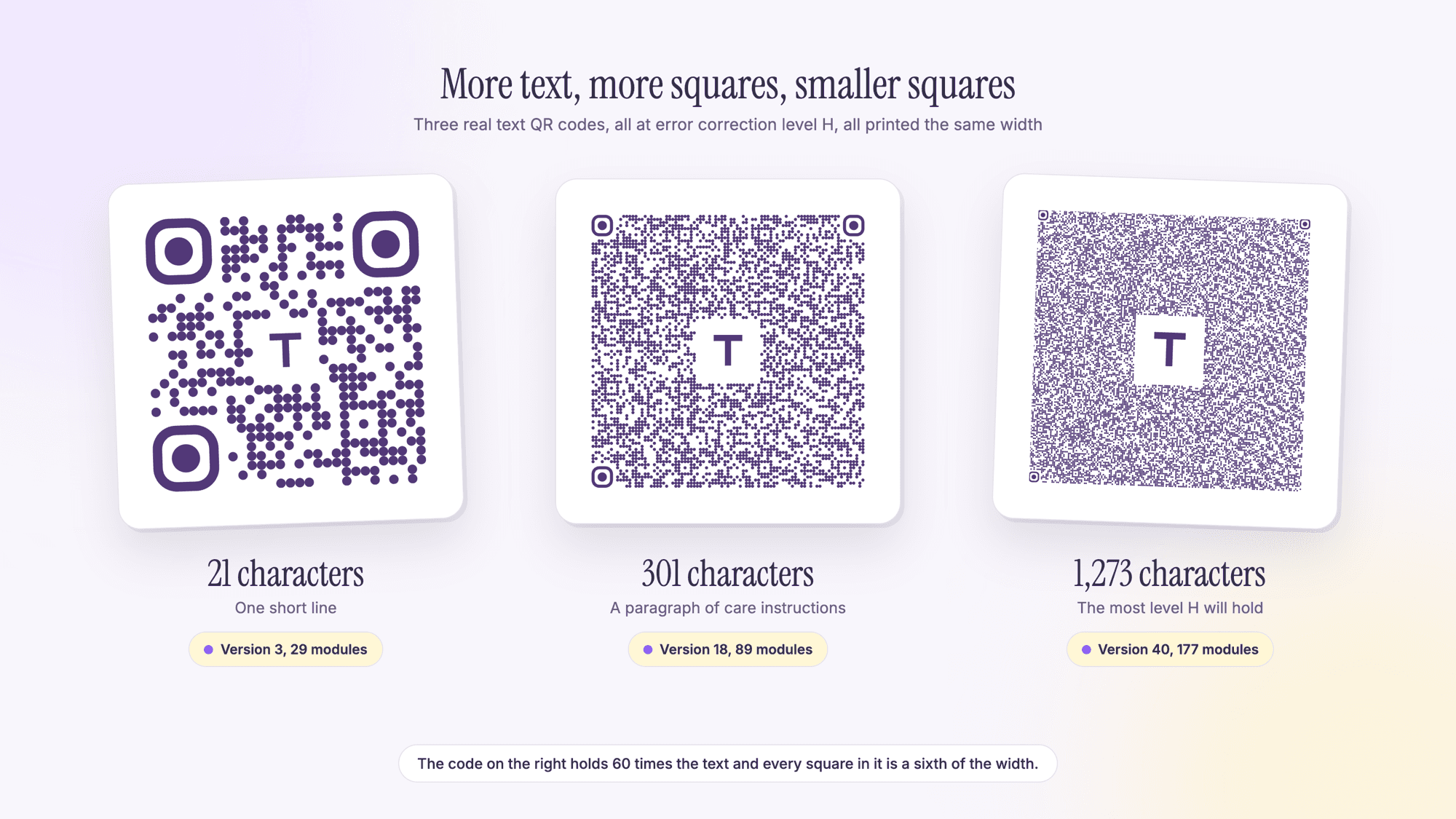
The three codes at the top of this page are the same table as a picture: 21 characters, 301 characters, and the 1,273 character ceiling, drawn at one width so you can see what each row costs you in density.
The real limit is print size, not the specification
Once you know the module count, the minimum printed width is arithmetic. Take the modules, add eight for the quiet zone that the specification requires on all four sides, and multiply by the module size your printer can hold. Denso Wave's printer table gives 0.33 mm per module for a 300 dpi printer at four dots per module, which is the smallest most people should plan around.
| Modules | With quiet zone | Minimum width at 0.33 mm | Roughly this much text at level H |
|---|---|---|---|
| 29 (version 3) | 37 | 12.2 mm, 0.48 inch | About 20 characters |
| 41 (version 6) | 49 | 16.2 mm, 0.64 inch | About 50 characters |
| 57 (version 10) | 65 | 21.4 mm, 0.84 inch | About 100 characters |
| 89 (version 18) | 97 | 32.0 mm, 1.26 inches | About 300 characters |
| 113 (version 24) | 121 | 39.9 mm, 1.57 inches | About 500 characters |
| 177 (version 40) | 185 | 61.1 mm, 2.4 inches | 1,273 characters, the maximum |
These are floors, not targets. Distance multiplies them, because a code read from across a room needs far more width than one read at arm's length. Surface multiplies them too: textured stock, curved packaging, fabric, and gloss all blur the edges of small modules. And a code with a logo at level H is already spending redundancy on the logo, so it has less margin left for a rough print. If your design cannot give the code the width the table asks for, the answer is to put less inside the code, not to shrink it and hope.
Limits by QR code type
Character limits feel abstract until you map them onto the kinds of codes people actually make. Here is what typical content costs.
| Code type | Typical content length | Typical grid at level H | Does length ever become a problem? |
|---|---|---|---|
| URL | 20 to 60 characters | 29 to 45 modules | Only with long tracking parameters |
| Plain text | Whatever you type | 29 modules and up | Constantly. This is the type that outgrows the page |
| vCard | 150 to 300 characters | 65 to 89 modules | Yes, once you add an address and a long title |
| WiFi | 30 to 60 characters | 33 to 45 modules | Rarely, unless the password is very long |
| SMS | 20 to 80 characters | 29 to 49 modules | Only if you pre write a long message |
| 40 to 200 characters | 37 to 77 modules | Yes, if the subject and body are long | |
| Location | Around 25 characters | 33 modules | No |
Plain text is the type that runs into the limit most often, simply because there is nothing stopping you typing more; our walkthrough on putting plain text in a QR code covers the practical lengths. Pre written messages are the quiet second offender, and plain text QR code vs SMS QR code shows how much smaller the SMS version of the same idea usually is.
Contact codes are the other type that runs into the ceiling in ordinary use, because a full contact card with a company, a job title, a street address, and a website adds up fast. Our guide to making a vCard QR code covers which fields to keep, and business card QR code guide covers the sizes that follow from them.
What to do when your content is too long
Put a link in the code and the content on a page. This is the answer nine times out of ten. A short link is twenty to sixty characters no matter how much material sits behind it, so the code stays small and coarse and scans from a distance. You also get the ability to fix a typo without reprinting anything. A Spotify share link, for example, is 53 to 56 characters, and the Spotify QR code guide shows how a tracking parameter on the end pushes it up a version. URL QR code basics covers the plain version of that code.
Use a dynamic code if the destination might move. A dynamic code holds a short redirect address you can repoint later, which also gives you scan counts. Every free QRCodePrime account includes 10 dynamic QR codes, free for life, with scan analytics, no credit card, no watermarks and no ads on the redirect. Our comparison of static and dynamic QR codes explains when each is right.
Shorten the link itself. Tracking parameters are often the reason a link code is denser than it should be. Trim what you do not need, and prefer a short path on your own domain over a long query string. The four Google Maps link lengths for one pin, from 41 to 191 characters, are the clearest example.
Trim the fields, for contact and WiFi codes. A contact card does not need a fax number and a full postal address to be useful. Removing two fields can drop a code by a whole version. The WiFi QR code guide lists what a network code must hold and nothing more.
Use capitals for reference data. If the content is genuinely a code or a reference and has to stay inside the pattern, writing it in uppercase keeps it in alphanumeric mode, which fits considerably more into the same symbol.
Split it across two codes, as a last resort. Two labeled codes with two short messages beat one enormous code nobody can read. This works for things like a part number and a service history, where the two facts are genuinely separate.
Signs there is too much data in your code
It scans on screen but not on paper. The classic symptom of a code past its comfortable density. The monitor is backlit and sharp; the print is neither.
The reader has to get very close. If people are holding their phone two inches from the code, the modules are too small for the distance you are asking for.
It works on a new phone and not an older one. Camera resolution and autofocus quality vary a great deal, and a dense code is where that difference shows.
The pattern looks like grey noise from arm's length. A useful eye test. If you cannot see individual squares from where your reader will stand, the camera is struggling too.
It fails after printing on anything textured. Kraft paper, fabric, and matte packaging all eat small modules. A coarser code with less data inside it is the fix.
If you are troubleshooting a specific failure, work through it in order: reduce the content, print it larger, check the contrast is dark on light, and confirm the quiet zone is clear on all four sides. That sequence resolves the large majority of codes that will not read. The guide to a QR code that will not scan goes through them by symptom.
Sources
- Denso Wave: Information capacity and versions of the QR Code
- Denso Wave: Error correction feature
- Denso Wave: Point for setting the module size
- Denso Wave: Point for determining the code area, including the four module margin
- IETF RFC 5724: URI Scheme for GSM Short Message Service
Common questions about QR code character limits
What is the maximum number of characters in a QR code?▾
7,089 digits, 4,296 uppercase alphanumeric characters, or 2,953 bytes of ordinary text. All three assume a version 40 symbol, 177 modules on a side, at the weakest error correction level. At the strongest level the text limit drops to 1,273 characters.
How many characters should a QR code actually have?▾
Aim for under 300, and under 100 if the code will be printed small or read from a distance. Around 300 characters the code reaches 89 modules at the strongest error correction level, which needs about 1.26 inches of clean print at the smallest safe module size.
Why does adding more text make a QR code harder to scan?▾
More data means more squares in the grid. A 21 character code is 29 squares across and a 1,273 character code is 177. Printed at the same width, each square in the larger code is a sixth of the size, which is closer to what a phone camera can separate on paper.
Does error correction reduce the character limit?▾
Yes, substantially. The four levels hold 2,953, 2,331, 1,663 and 1,273 bytes at version 40, so the strongest level holds 43 percent of what the weakest does. The space is spent on redundancy that lets a damaged or partly covered code still be read.
Why does uppercase text fit better than lowercase?▾
The specification has a compact alphanumeric mode covering digits, uppercase letters, the space and a few symbols. A single lowercase letter forces that run of data into the less efficient binary mode. For reference data such as part numbers, capitals genuinely fit more into the same symbol.
How big does a QR code have to be for 1,000 characters?▾
At the strongest error correction level, 1,000 characters produces a 161 module code. With the four module quiet zone on each side that is 169 modules, which at 0.33 mm per module is 55.8 mm, or about 2.2 inches, before you allow anything for distance or a rough surface.
What should I do if my content will not fit in a QR code?▾
Put a short link inside the code and the content on a page. A link is twenty to sixty characters regardless of how much material sits behind it, so the code stays small and easy to scan, and you can correct the content later without reprinting.
Is there a character limit on a dynamic QR code?▾
The code itself holds only a short redirect address, so it is small no matter how long the destination page is. The practical limit moves to the page, which has none. Every free QRCodePrime account includes 10 dynamic QR codes, free for life, with scan analytics, no credit card and no watermarks.
Type your content, watch the pattern change. Free, no signup, no watermark.
Make a QR code and see its sizePublished by
QRCodePrime Team
Guides on making, printing and scanning QR codes
Published by the team behind the free QRCodePrime generator and scanner. The example codes in our illustrations are real codes made with the generator, numbers are either computed by us or quoted from a source we name, and the sources are linked at the end of each article. Found a mistake? Email hello@qrcodeprime.com and we will fix it.