
Plain Text QR Code vs SMS QR Code: Which to Use
Last updated Sep 13, 2026
On this page
- The short version
- The one question that decides it
- What each of the two codes actually does
- Plain text and SMS side by side
- What is inside each code
- How to make each one
- What phones do with an SMS code, and where it goes wrong
- Where each one belongs
- WhatsApp, email, and phone codes
- Mistakes that waste an SMS or text code
- Sources
- Common questions about text message QR codes
Both codes look identical and they do completely different things. A plain text QR code shows words on the screen and stops there. An SMS QR code opens the phone's messaging app with your number in the To field and your message already typed, so the person only has to press send. If you want a reply, you want the SMS code. If you want someone to read something, you want plain text.
People searching for a QR code text message usually mean the second one and end up with the first, because the word text means two things. This page separates them properly: what sits inside each code, what each phone does with it, where each belongs, and where the SMS version quietly breaks. Both live on our site already, as the text QR code generator and the SMS QR code generator, and both sit alongside every other type in the free QR code generator.
The short version
Choose SMS when you want the scan to start a conversation: joining a waitlist, replying to a keyword, requesting a callback, reporting a fault, opting into alerts.
Choose plain text when you want the scan to deliver information: instructions, a serial number, opening hours, a short notice that has to work with no signal.
The cost of guessing wrong is entirely on the reader. Put a phone number in a plain text code and everyone who scans it has to open Messages and copy the number across by hand. Most of them will not.
Both are static and free. Neither can be edited after printing and neither counts scans. Static QR codes on QRCodePrime are unlimited and free with no account, no watermarks and no ads.
The one question that decides it
Ask what you want to happen in the two seconds after the camera reads the code. There are only two honest answers, and they map cleanly onto the two code types.
If the answer is that the person should now know something, plain text is right. The information appears, they read it, they move on. Nothing is opened and nothing is sent.
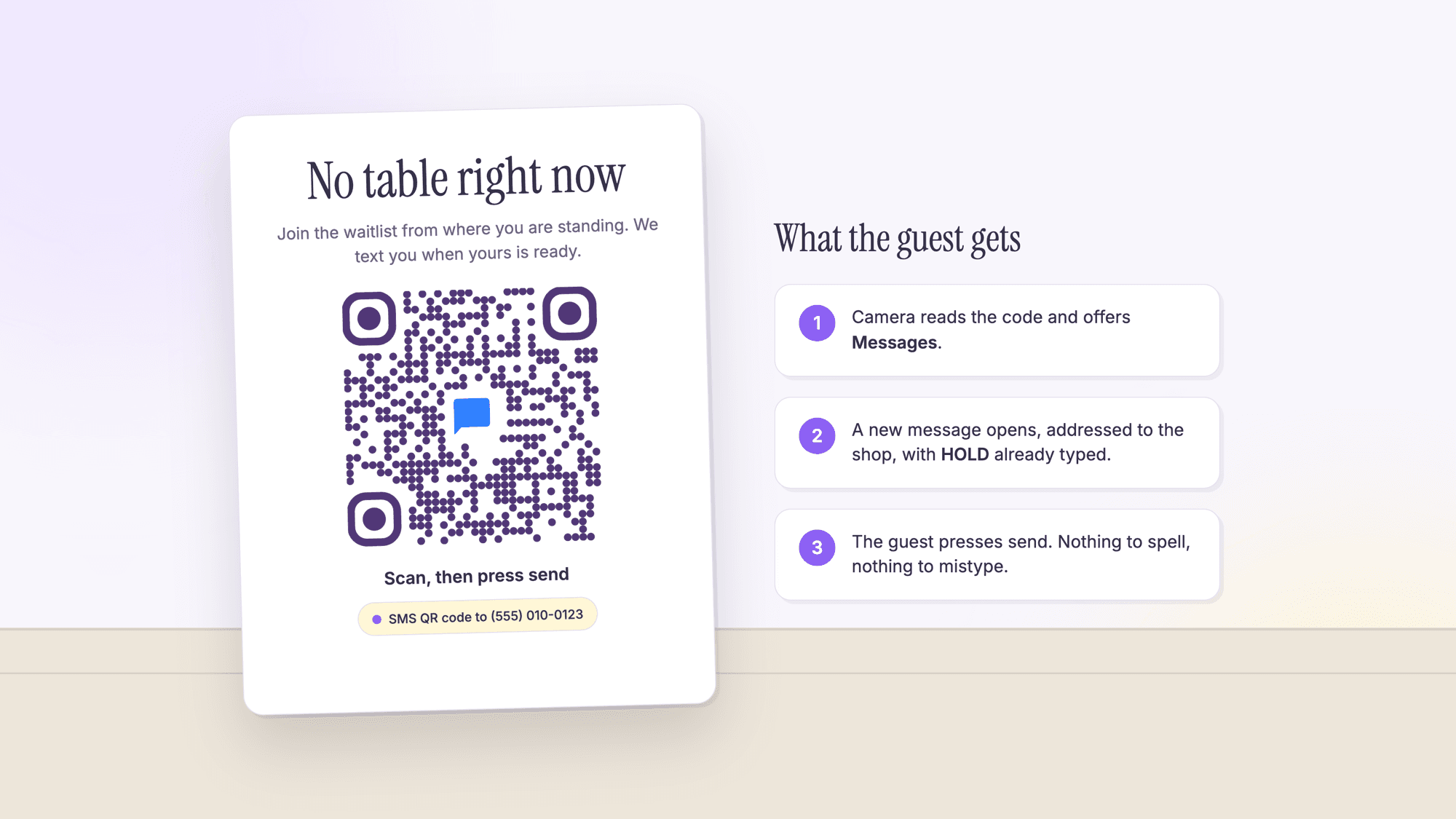
If the answer is that the person should now do something, and that something is contacting you, an SMS code is right. The messaging app opens, addressed and pre written, and the only remaining action is a single tap.
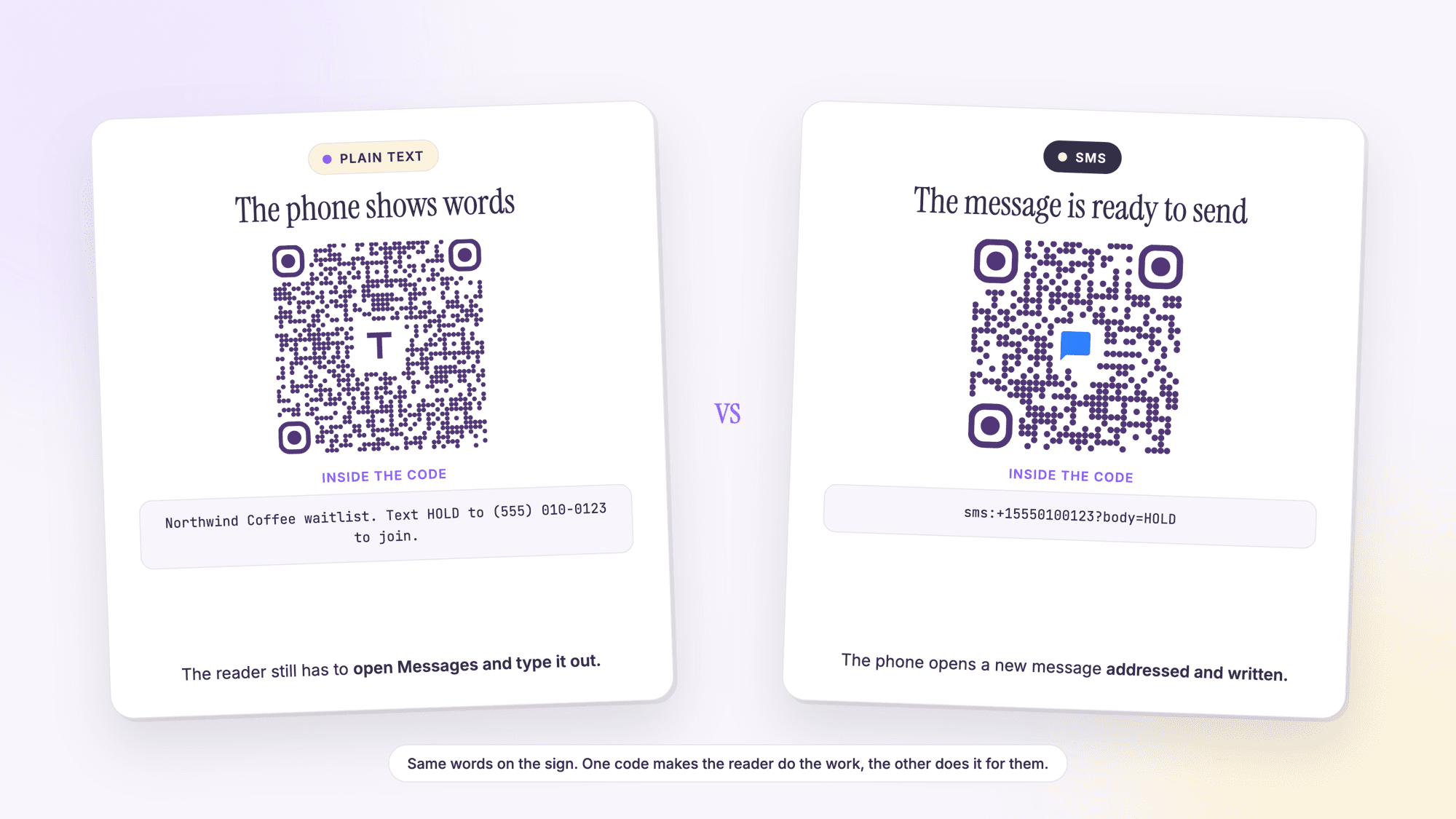
The picture at the top of this page shows both sides of that. Same waitlist, same phone number, two codes: one delivers a sentence the reader has to act on, the other delivers a message the reader only has to send.
What each of the two codes actually does
Plain text. The code contains only the characters you typed. There is no prefix, no scheme, nothing a phone recognizes as an instruction. Reader software decodes the string, fails to match it against anything actionable, and shows it as text. A plain text code that reads Text HOLD to 555 010 0123 is a printed sentence delivered by camera, and the reader has to do everything after that.
SMS. The code contains a URI, a formal address of the kind a web link is. The sms scheme is a published internet standard, RFC 5724, written at the IETF in 2010. It defines a single optional field called body, which carries the message text, and it lays out how a phone should behave: parse the recipient, start composing with that body, and send it with the device's normal delivery method. That is why an SMS code can arrive with a message already written. It is specified behavior, not a trick.
QRCodePrime builds SMS codes to that standard. Enter a number and a message on the SMS generator and the code contains something like sms:+15550100123?body=HOLD, with the message percent encoded exactly as the URI syntax requires.
Plain text and SMS side by side
| Plain text QR code | SMS QR code | |
|---|---|---|
| What the phone does | Shows the characters | Offers to open the messaging app |
| Taps needed to contact you | Several, plus typing | Two: open, then send |
| Works with no signal | Yes, fully | It composes, but it cannot send |
| Costs the reader money | Never | Whatever a text costs on their plan |
| Works on a tablet or laptop | Yes | Only if the device can send texts |
| Typical size of the code | Grows with the message | Small, because the payload is short |
| Editable after printing | No | No |
| Scan counting | No | No, but replies arrive in your inbox |
| Best for | Information | Starting a conversation |
The scan counting row deserves a note, because it is where people reach for the wrong tool. Neither of these code types can report anything back, since nothing contacts a server when they are scanned. An SMS code gives you the next best thing: every person who presses send lands in your messages, which is a record of interest you can actually answer. If you need real scan analytics, that means a dynamic link code instead, and on QRCodePrime every free account includes 10 dynamic QR codes, free for life, with scan analytics, no credit card, no watermarks and no ads on the redirect. Our comparison of static and dynamic QR codes covers where that line sits.
What is inside each code
Seeing the payloads next to each other makes the difference concrete. Each of these is the exact string our generator puts inside the pattern.
| Code type | What the pattern contains | Length |
|---|---|---|
| Plain text | Northwind Coffee waitlist. Text HOLD to (555) 010-0123 to join. | 63 characters, 45 modules |
| SMS | sms:+15550100123?body=HOLD | 26 characters, 33 modules |
| Phone | tel:+15550100123 | 16 characters |
| mailto:hello@example.com with a subject and a body | Depends on the message |
The module counts come from encoding each string with the same library the site uses, at the highest error correction level. Note the direction of travel: the SMS code is shorter than the plain text version of the same idea, so it is also the smaller, easier to scan code. Asking someone to do less and printing a coarser pattern happen to be the same decision here. If you want the full picture of how length drives code size, see the QR code character limit.
How to make each one
An SMS code, in four steps. Open the SMS QR code generator. Enter the phone number in full international form, starting with the country code, so plus one for the United States. Type the message you want pre written into the message field, keeping it to one short line. Download the SVG for print or the PNG for screens, then scan the result with an iPhone and an Android phone and check that the message opens addressed correctly.
A plain text code, in three. Open the text QR code generator, type your message into the Text Content field, and download the file. Proofread before you download, because static codes cannot be corrected later. Our full walkthrough is in putting plain text in a QR code, including how long the message can be and how big to print it.
The one setting that matters for both is the number format. Write the recipient as plus one, then the ten digits, with no brackets, spaces, or dashes inside the code. RFC 5724 takes its number notation from the tel URI standard, which says numbers should be in the global form, starting with a plus, unless they cannot be represented that way. A local number without a country code is the most common reason an SMS code composes a message on your phone and fails on someone else's.
What phones do with an SMS code, and where it goes wrong
The normal path. The camera reads the code, recognizes the sms scheme, and offers to open the messaging app. The reader taps, a new message appears with your number in the To field and your text in the body, and they press send. On Android, Google's help page confirms that scanning a code can open an app rather than a browser. On iPhone, Apple documents the same two entry points as for any other code: the Camera app and the Code Scanner control in Control Center.
Where it breaks, in order of how often it happens.
The number was written in local form. It works on your phone, because your phone is on the same network your number belongs to, and fails or dials the wrong place abroad. Always write the country code.
The body was too long. The standard describes the body as the text the phone should start composing with, and leaves the composing itself to the device. Phones differ in how much they carry across, so a long message can arrive complete on one handset and cut short on another. Keep the pre written message to one short line. A keyword is perfect.
The reader is on a tablet, a laptop, or a phone with no plan. A plain text code would have worked there; an SMS code will not send. If your audience is likely to scan from a desk, add the information in text next to the code as well.
The person does not want to pay for a text. Most plans in the United States include unlimited messages, but not all do, and international visitors often pay per message. Say what the text is for so the decision is informed.
Nobody is watching the inbox. The most expensive failure of all, and it has nothing to do with the code. An SMS code is a promise of a reply. Decide who answers it before you print it.
Where each one belongs
SMS codes earn their place at a counter. A waitlist sign in a restaurant lobby, a keyword to opt into delivery alerts, a maintenance report card in a stairwell, a pickup notification at a parts desk, a text to book a viewing on an estate agent's window card. In each case the scan produces a message you can answer, and the reader types nothing. Clinics use the same two codes on appointment cards; the healthcare QR code guide covers what may and may not go behind them.
Plain text codes earn their place away from a signal. Equipment labels, storeroom instructions, exhibit captions, delivery notes on a back door, a classroom answer key. The reader needs to know something, not tell you something, and often has one bar or none.
Restaurants and events use both at once. A table tent carries a menu link, a lobby sign carries the SMS waitlist code, and a wall notice carries plain text opening hours. Our guides to QR code menus for restaurants and QR codes for restaurants cover the placement side, and QR codes for events covers the same pattern at a venue.
WhatsApp, email, and phone codes
SMS is not the only way to make a scan start a conversation, and the right one depends on where your audience already talks.
WhatsApp. A WhatsApp QR code opens a chat with a pre written message instead of a text message. It costs the reader nothing beyond data, works internationally without number formatting surprises, and is the better choice wherever WhatsApp is the default. It does require the app to be installed.
Email. An email QR code opens a message with the address, subject, and body filled in. Use it when you want something longer than a keyword, such as a support request with a reference number already in the subject line.
Phone. A phone QR code brings up the dialer with your number ready. It suits urgent contact where a conversation beats a message, though many people now prefer not to call.
Contact details. If what you actually want is for someone to save your number rather than message it, that is a contact code. Our guide on making a vCard QR code covers it.
Mistakes that waste an SMS or text code
Printing a phone number as plain text and expecting messages. The reader has to retype it. Almost nobody does.
Leaving out the country code. The single most common cause of an SMS code that works for you and fails for a visitor.
A pre written message nobody understands. HOLD, JOIN, or ORDER 14 is fine if the sign explains it. A bare keyword with no context makes people hesitate before sending.
Writing a paragraph into the body field. Long bodies get cut at different points on different phones. One line.
No instruction beside the code. Scan, then press send is five words and it removes the entire question of what is about to happen.
Never testing on a second phone. Print it, scan it with an iPhone and an Android phone, and confirm the message opens with the right number and the right text before anything is ordered in bulk. The two-phone print test has the routine, and the fixes by symptom cover a code that fails anyway.
Sources
- IETF RFC 5724: URI Scheme for GSM Short Message Service
- Apple Support: Scan a QR code with your iPhone or iPad
- Google Help: Scan QR codes on Camera from Google
- Denso Wave: Information capacity and versions of the QR Code
- Denso Wave: Error correction feature
Common questions about text message QR codes
What is the difference between a text QR code and an SMS QR code?▾
A text QR code contains plain characters, so scanning it shows words on the screen and nothing else happens. An SMS QR code contains an sms address, so scanning it offers to open the messaging app with your number in the To field and your message already typed. One informs, the other starts a conversation.
Can a QR code send a text message by itself?▾
No. RFC 5724, the standard that defines the sms address, has the phone start composing a message from the body in the code. Composing is where it stops: on every phone in normal use the person presses send. The code fills in the recipient and the text and nothing more.
How do I write the phone number in an SMS QR code?▾
In full international form: a plus sign, the country code, then the number, with no spaces, brackets or dashes. For the United States that is plus one followed by ten digits. RFC 5724 takes its number format from the tel URI standard, which requires the global form wherever a number can be written that way.
Does an SMS QR code work on both iPhone and Android?▾
Yes, on any phone that can send text messages. Apple documents scanning through the Camera app and the Code Scanner control, and Google's help page says a scan can open an app rather than a browser. It will not work on a device with no messaging service, such as most tablets and laptops.
How long can the pre written message be?▾
Keep it to one short line. The standard says the phone should start composing from the body in the code, but leaves the composing to the device, so phones differ in how much of a long message they carry across. A single keyword, such as HOLD or BOOK, is the most reliable choice and keeps the code small.
Can I track how many people scanned my SMS QR code?▾
Not the scans themselves, because nothing is contacted when the code is read. What you see is the messages that arrive, which is a record of the people who followed through. For real scan counts you need a dynamic link code, and every free QRCodePrime account includes 10 dynamic QR codes, free for life, with scan analytics, no credit card and no watermarks.
Does scanning an SMS QR code cost the person money?▾
Scanning is free. Sending the message costs whatever a text costs on their plan, which for most people in the United States is nothing, but not for everyone and not for many international visitors. Saying what the message is for lets people decide before they send it.
Should I use WhatsApp instead of SMS?▾
Use WhatsApp where your audience already uses it, especially outside the United States, because it costs the reader nothing beyond data and avoids number formatting problems. Use SMS where you cannot assume the app is installed. Both open a conversation with a message already written.
Number in, message pre written, one tap to send. Free, no signup, no watermark.
Make an SMS QR codePublished by
QRCodePrime Team
Guides on making, printing and scanning QR codes
Published by the team behind the free QRCodePrime generator and scanner. The example codes in our illustrations are real codes made with the generator, numbers are either computed by us or quoted from a source we name, and the sources are linked at the end of each article. Found a mistake? Email hello@qrcodeprime.com and we will fix it.