
QR Code Not Scanning? Every Fix, by Symptom
Last updated Sep 20, 2026
On this page
- The short version
- Start here: is it the phone or the code
- When the phone will not scan anything
- When one printed code will not scan
- Size: the cause most people miss
- The missing quiet zone
- When people cannot scan it but you can
- When the code is on a screen
- When it scans but nothing happens
- One more possibility: the code is not the one you think
- Mistakes that keep codes broken
- Sources
- Common questions about a QR code that will not scan
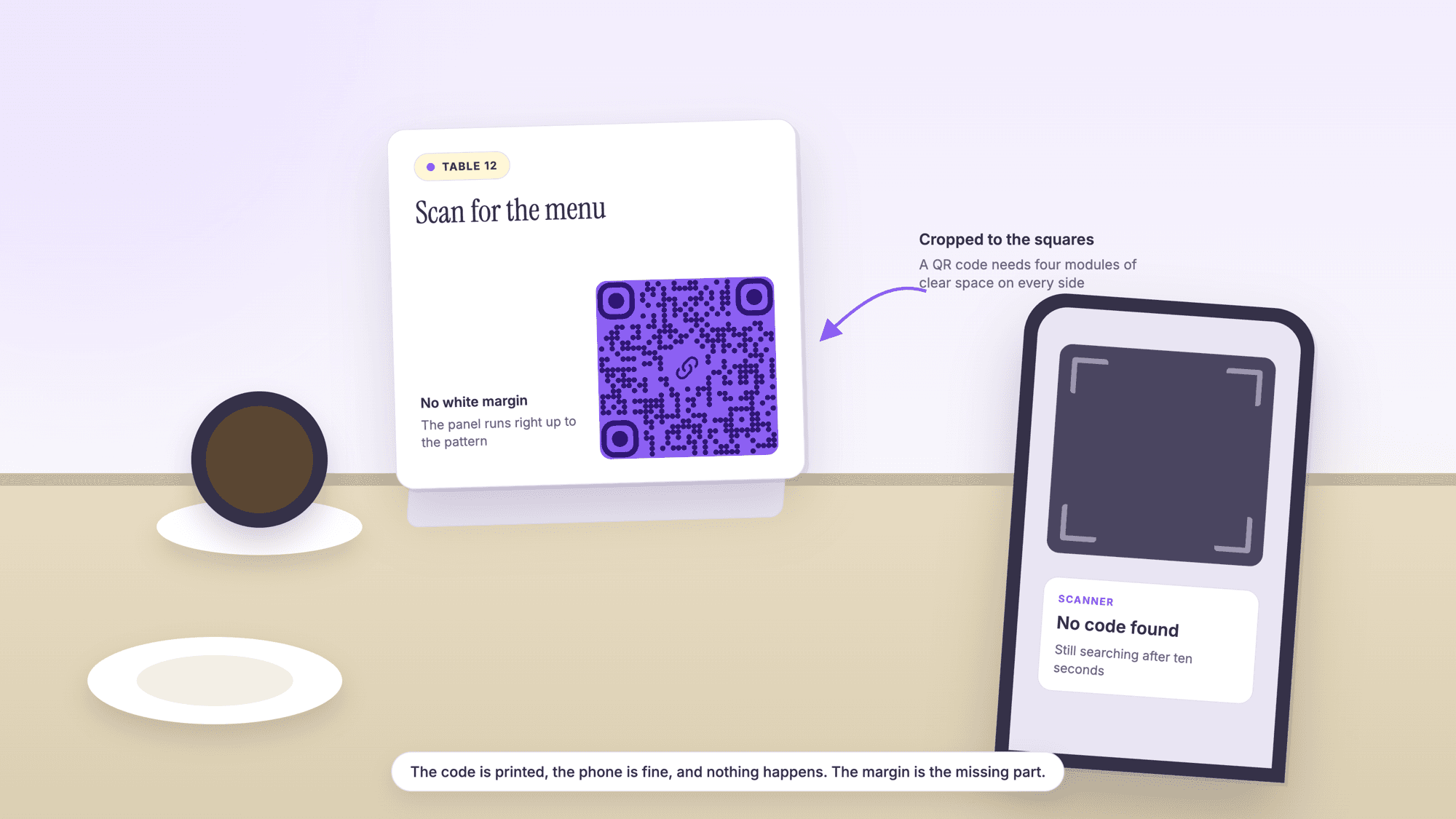
When a QR code will not scan, work out first whether the phone is the problem or the code is. Scan a code you know works, such as one on a product box. If that reads, the phone is fine and the fault is in the code: usually it is too small for the amount of data in it, the white margin has been cropped away, or the contrast is wrong. If nothing scans, the camera is in the wrong mode or scanning is switched off.
That one test splits every case into two piles and saves a lot of guessing. Below are the fixes for both, ordered by how often each one turns out to be the cause, with the sizes and margins worked out rather than estimated. If you would rather read the code some other way right now, our online QR scanner takes a photo or a screenshot and decodes it in your browser, and it retries your picture at several sizes and in inverted colors before it gives up.
The short version
Test the phone with a known good code first. Thirty seconds, and it tells you which half of this page you need.
On a phone that scans nothing: stay in the standard photo mode, not portrait or video, hold still for two seconds, clean the lens, and on an iPhone try the Scan Code control in Control Center.
On a code that nobody can scan: it is nearly always size, margin or contrast. Those three account for most printed failures.
A code with a lot of content is a harder code. More characters means more squares, which means smaller squares at the same printed width.
If the code reads but the page does not load, the code is fine and the problem moved to the destination.
Start here: is it the phone or the code
Point your camera at any QR code you know works, on a parcel, a product label or this page on another screen. What happens next tells you where to look.
| What you see | What it means | Where to go next |
|---|---|---|
| No code reads, not even a known good one | The camera is in the wrong mode, this phone does not scan from the camera app, or the lens is dirty | The phone fixes below |
| Other codes read, this one never does | Size, margin, contrast or a damaged pattern | The printed code fixes below |
| It reads for you and not for customers | Distance, light or placement, not the code file | The distance and placement section |
| A banner appears, then nothing happens | The code decoded and the destination failed | The dead destination section |
| It reads on paper but not on a screen | Screen glare, brightness or a scaled down image | The on screen section |
When the phone will not scan anything
A camera that reads no codes at all is almost always a settings or mode problem, and all of these take a few seconds.
Use the normal photo mode. Google's help page for Camera from Google is explicit that you cannot scan a QR code in portrait or video mode. Switch back to the standard mode, or use the dedicated QR mode if your camera has one.
Hold still and fill the frame. Get the code into roughly the middle of the picture, about the width of a business card in the frame, and wait two seconds. Autofocus needs a moment and a moving phone never gets one.
Clean the lens. A thumbprint on the camera glass looks like nothing and destroys the edges of small squares.
On an iPhone, use Photo mode, then try the Scan Code control. Apple's instruction is to open Camera, and in Photo mode position the iPhone so the QR code appears inside the frame, then tap the link at the bottom of the screen. If that does nothing, open Control Center and use the Scan Code control, adding it from the control gallery if it is not there already. Apple's guide also suggests tapping the flashlight inside that control to add light, which fixes a surprising number of dim-room failures.
On Android, try the QR mode or Google Lens. Camera scanning is not on every Android phone: Google's own help page says the feature is available only on selected devices, and that portrait and video modes cannot scan. Google Lens reads codes from the camera and from pictures you have already taken, which covers the phones whose camera app will not.
Back off the zoom. Pinching in usually makes things worse, because digital zoom softens the exact edges the decoder needs. Move the phone instead.
Restart the phone. A camera that will not focus at all, on anything, is a stuck camera rather than a QR problem.
Or skip the camera. Take a photo of the code and upload it to the scanner. It runs in the browser with nothing to install, which also answers the case where you are on a laptop with no camera at all.
When one printed code will not scan
If other codes read fine, the fault is in this code. These are the causes in the order they actually occur.
It is too small for what is in it. The most common cause by a distance, and the least obvious, because a code that is too small still looks like a code. See the numbers below.
The white margin is gone. The second most common, and usually a crop. The next section covers it.
Low contrast. A pale grey code on a cream card, or a dark code on a dark background, gives the decoder nothing to separate. Pure dark on pure light is the reliable combination.
It is inverted. Light pattern on a dark field. Some readers handle it and many do not. If a designer has inverted the code for a dark layout, put it back and place it on a light panel instead.
Glare, gloss or lamination. A laminated menu under a downlight reflects straight into the lens. Tilt the card or move it out of the reflection to confirm, then plan for a matte finish on the reprint.
A curve or a fold. A code on a cup, a bottle or across the fold of a leaflet distorts the grid. Shoot it straight on, and on the reprint move the code to a flat panel.
Ink spread or a light print. On uncoated stock the squares can close up; on a low toner print they break up. Look at the three big corner squares: if they are ragged, the print is the problem.
Damage and dirt. Codes carry redundancy, so a scuff is often survivable, but the amount depends on the error correction level chosen when the code was made. Denso Wave's own summary puts level M at 15 percent of the total codewords and level Q at 25 percent, and notes that level M is the one most often chosen. Every code from QRCodePrime is generated at the highest of the four levels, which is why a logo in the middle of one still reads.
Something was drawn on top. A logo that is too big, a frame that overlaps the pattern, or a gradient across the squares. If a code stopped working after a design pass, that is where to look.
Size: the cause most people miss
A QR code is not one size. The more you put inside it, the more squares it has, and at a fixed printed width more squares means each one is smaller. Past a point, the camera cannot separate them.
We encoded a set of everyday payloads with the same library the site's generator uses, at the strongest error correction level, to show how fast this moves.
| What is inside | Characters | Squares across | Square size in a 1.2 in slot, margin included |
|---|---|---|---|
| Short link | 20 | 29 | 0.032 in |
| Plain domain | 27 | 33 | 0.029 in |
| Page address with UTM tags | 95 | 53 | 0.020 in |
| Short contact card | 102 | 57 | 0.019 in |
Between the first row and the last, the printed square shrinks by 43 percent in the same 1.2 inch slot, on the same card, for content most people would call similar. That is the whole mechanism behind a code that will not read. The fix is either a wider code or a shorter payload, and shortening is usually free: point the code at a short link on your own domain instead of a long tracked address.
For the full relationship between characters, versions and width, see the QR code character limit. To avoid the problem on the next run, work through testing a QR code before printing.
The missing quiet zone
Every QR code needs a clear border with nothing in it. Denso Wave puts the requirement in a single sentence: "QR Code requires a four-module wide margin at all sides of a symbol." A module is one of the code's own small squares, so the margin grows with the code.
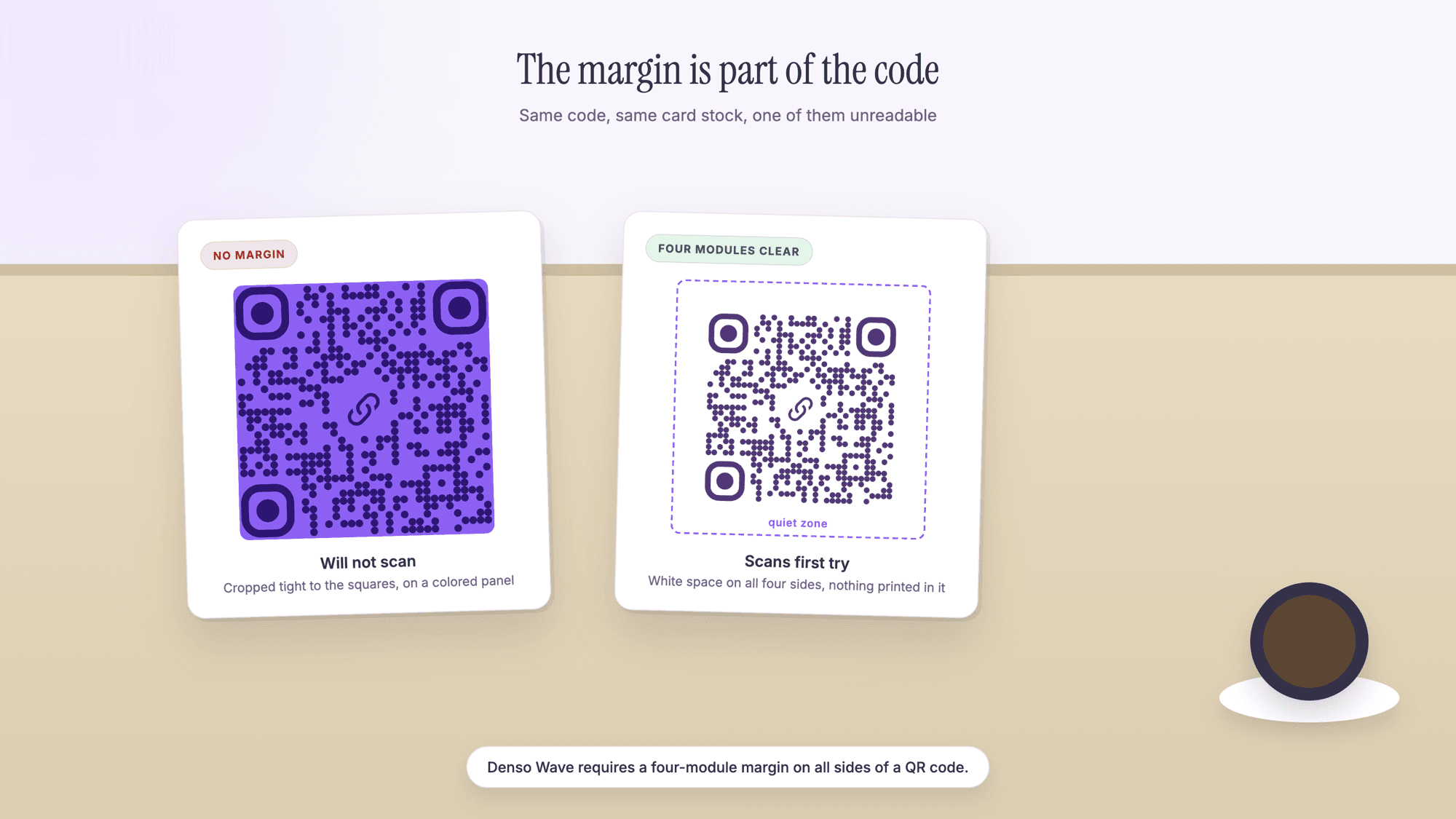
On a 33 square code whose pattern is 1.2 inches wide, each square is about 0.036 inches and the required margin is about 0.145 inches on every side. That is not much, and it disappears in ordinary layout work: the image is cropped tight to the black pixels, the code is dropped onto a colored block that runs right up to the pattern, a hairline border is drawn around it, or a caption is set too close underneath.
Two quick tests. On paper, lay a white sheet over the area immediately around the code and scan again. If it now reads, the margin is your problem. On screen, paste a tightly cropped screenshot into our scanner: our own scanner page adds a margin and retries for exactly this reason, which is a good hint about how often it comes up.
When people cannot scan it but you can
A code that works at your desk and fails in the room is a placement problem, not a file problem.
Distance. A code sized for a card in the hand will not read from across a lobby. Either move the code closer to the reader or make it larger; there is no third option.
Light. Dim rooms push the camera into a longer exposure, which blurs a handheld shot. A code in a bar or a stairwell needs to be bigger than the same code in a lit shop.
Height and reach. Above head height, behind a counter, low on a floor stand, or on the far side of a glass case. If a phone cannot get square to the code within arm's reach, it fails.
Glass. Window decals reflect the street. Check at midday and after dark, from where people will stand rather than pressed against the pane.
No instruction. Some of what looks like failure is hesitation. A short line saying what the scan does removes it.
Table tents, signs and menus have their own placement rules, and the restaurant menu guide and the restaurants page cover the ones that matter most in a dining room.
When the code is on a screen
Scanning a code off a monitor or a second phone has its own failure modes.
Raise the brightness on the screen showing the code, and drop it if the screen is so bright it blooms.
Kill the reflection. A screen is a mirror. Change the angle so the reading phone is not photographing a window or a light.
Show it bigger. A code in an email on a phone screen may be a couple of hundred pixels wide. Open the image full screen, or zoom the page, before the other phone tries.
Do not photograph one phone with another if you can avoid it. Screenshot the code and read the screenshot instead: on the same device, take the screenshot and upload it to the scanner, which skips the camera entirely and is the reliable route for a code that arrived in a message, a PDF or a social post.
When it scans but nothing happens
If a banner appears with an address and the page then fails, the code did its job. Everything after that is the destination.
The page is gone. An event page taken down, a file moved, a site rebuilt with different addresses. A static code cannot be repointed, so this means a reprint unless the code was dynamic.
The link was typed without https. Some readers will not treat a bare domain as a link at all, and just show it as text. Remaking the code with the full address takes a moment in the free QR code generator, though a code already in print cannot be corrected that way.
The shortener expired. Third party short links can lapse or change hands. Printed codes belong on a domain you control.
The page is slow on mobile data. Test the destination with WiFi off, because a scan in a car park is not a scan in the office.
A WiFi code fails to join. Almost always a wrong security type or a password with a character the code was not given cleanly. Our WiFi QR code guide covers the fields.
A contact code saves nothing. A malformed contact card, usually a missing end line or a phone number without a country code. The vCard guide has the format.
For anything already printed where the destination has to change, a dynamic code is the way out next time. Every free QRCodePrime account includes 10 dynamic QR codes, free for life, with scan analytics, no credit card required, no watermarks, and no ads or interstitial pages on the redirect, while static codes stay unlimited and free with no account. The comparison is in static versus dynamic QR codes.
One more possibility: the code is not the one you think
If a code in a public place suddenly stops behaving, consider that it may have been replaced. A sticker over a printed code is the swap both the FBI and the FTC warn about, and a code that now goes somewhere unexpected is the symptom. Read the address before you act on it, and see QR code scams and quishing, or check any code at once with our QR code safety check.
Mistakes that keep codes broken
Making the code bigger without shortening the link. It helps, but shortening the payload is the cheaper half of the same fix and people skip it.
Redesigning the code. Heavy color, gradients, rounded shapes and oversized logos each cost reliability. If a code broke after a brand pass, revert it and reintroduce changes one at a time.
Testing only on the newest phone in the office. The camera that decides is the oldest one your customers carry.
Testing only on screen. Paper behaves differently, and paper is what you are printing.
Assuming it is the phone. When several people fail on the same code, it is the code.
Reprinting before diagnosing. Find out which of size, margin or contrast caused it, or the reprint repeats it.
Sources
- Denso Wave: Point for determining the code area, including the four module margin
- Denso Wave: Error correction feature and the four levels
- Denso Wave: Information capacity and versions of the QR Code
- Apple Support: Scan a QR code with your iPhone or iPad, including the Scan Code control
- iPhone User Guide: Scan a QR code with your iPhone camera, including Photo mode and the Control Center flashlight
- Google Help: Scan QR codes on Camera from Google, including the portrait and video mode limitation
Common questions about a QR code that will not scan
Why is my QR code not working?▾
Scan a code you know works. If that one reads, the phone is fine and this code has a problem, nearly always size, a missing white margin or poor contrast. If nothing reads, the camera is probably in portrait or video mode, which cannot scan, or the lens needs a wipe, or this phone does not scan from its camera app at all.
Why will my iPhone not scan a QR code?▾
Apple's instruction is to open Camera, stay in Photo mode, position the iPhone so the code appears inside the frame, then tap the link at the bottom of the screen. Hold still for two seconds and fill about a third of the frame. If nothing appears, open Control Center and use the Scan Code control, adding it from the control gallery if you do not see it, and tap the flashlight inside it when the light is poor.
Why will my Android phone not scan a QR code?▾
Camera scanning is not on every Android phone. Google's help page says the feature is available only on selected devices, and that portrait and video modes cannot scan at all. Switch to the standard photo mode or the QR mode, or use Google Lens, which reads codes from the camera and from pictures already in your gallery.
How do I fix a QR code that is too small to scan?▾
Make the code wider, shorten what is inside it, or both. Shortening is the cheaper half: a 20 character link makes a 29 square code while a 102 character contact card makes a 57 square one, so in the same 1.2 inch slot each square is 43 percent smaller in the second case. Point the code at a short address on your own domain.
Does a QR code need a white border?▾
Yes. Denso Wave requires a clear margin four modules wide on all four sides, a module being one of the code's own squares. On a 33 square code whose pattern is 1.2 inches wide that is roughly 0.145 inches of empty space on each side. Cropping tight to the pattern is one of the most common reasons a good code stops reading.
Can a damaged or dirty QR code still be read?▾
Often yes, because QR codes carry redundancy. How much depends on the error correction level: Denso Wave puts level M at 15 percent of the total codewords and level Q at 25 percent, and describes M as the level most commonly chosen. QRCodePrime generates every code at the highest of the four levels, which is why a logo in the middle still reads.
My QR code scans but the link does not open. What now?▾
The code is fine and the destination is the problem. Check that the page still exists, that the address was encoded with https, that any shortener you used is still live, and that the page loads on mobile data rather than only on WiFi. A static code cannot be repointed, so this usually means a reprint.
How do I scan a QR code that will not read with my camera?▾
Photograph it or screenshot it, then upload the picture to the QRCodePrime scanner. It runs in your browser with nothing to install, retries the image at several sizes and in inverted colors, and works on a laptop with no camera. The picture is decoded on your own device and never sent to us.
Upload a photo or paste a screenshot and see exactly what the code contains. Free, no app, nothing leaves your browser.
Read the code another wayPublished by
QRCodePrime Team
Guides on making, printing and scanning QR codes
Published by the team behind the free QRCodePrime generator and scanner. The example codes in our illustrations are real codes made with the generator, numbers are either computed by us or quoted from a source we name, and the sources are linked at the end of each article. Found a mistake? Email hello@qrcodeprime.com and we will fix it.