
QR Code Scams (Quishing): How to Spot and Avoid Them
Last updated Sep 20, 2026
On this page
- The short version
- What quishing is, and why it works so well
- Two links, one letter apart, and what the codes look like
- Where fake QR codes actually turn up
- How to read a QR code before you open it
- Warning signs, in the order they matter
- Payments deserve a stricter rule
- If you already scanned one
- Protecting the QR codes your own business prints
- Mistakes that get people caught
- Sources
- Common questions about QR code scams
A QR code scam works by putting a code where you expect a real one, or sending you one you did not ask for, so that the address behind it never gets read. The code itself cannot hurt you. The damage happens on the page it opens, when you type a card number, a password or a one time code into a site that only looks like the real one. The defense is to read the address before you open it.
Security people call this quishing, from QR and phishing. The FBI put out a public warning about it in January 2022, and the Federal Trade Commission followed with a consumer alert in December 2023. Both say the same thing in different words: the trick is not technical, it is a swap. This page covers where the swaps happen, how to read a code safely, what to do if you already scanned one, and how to protect the codes your own business prints. You can check any code right now with our free QR code safety check, which shows the full address without opening it.
The short version
Scanning is not the risky part. A QR code is a short piece of text, almost always a web address. Reading it does nothing on its own. Opening the address and typing something into it is where money moves.
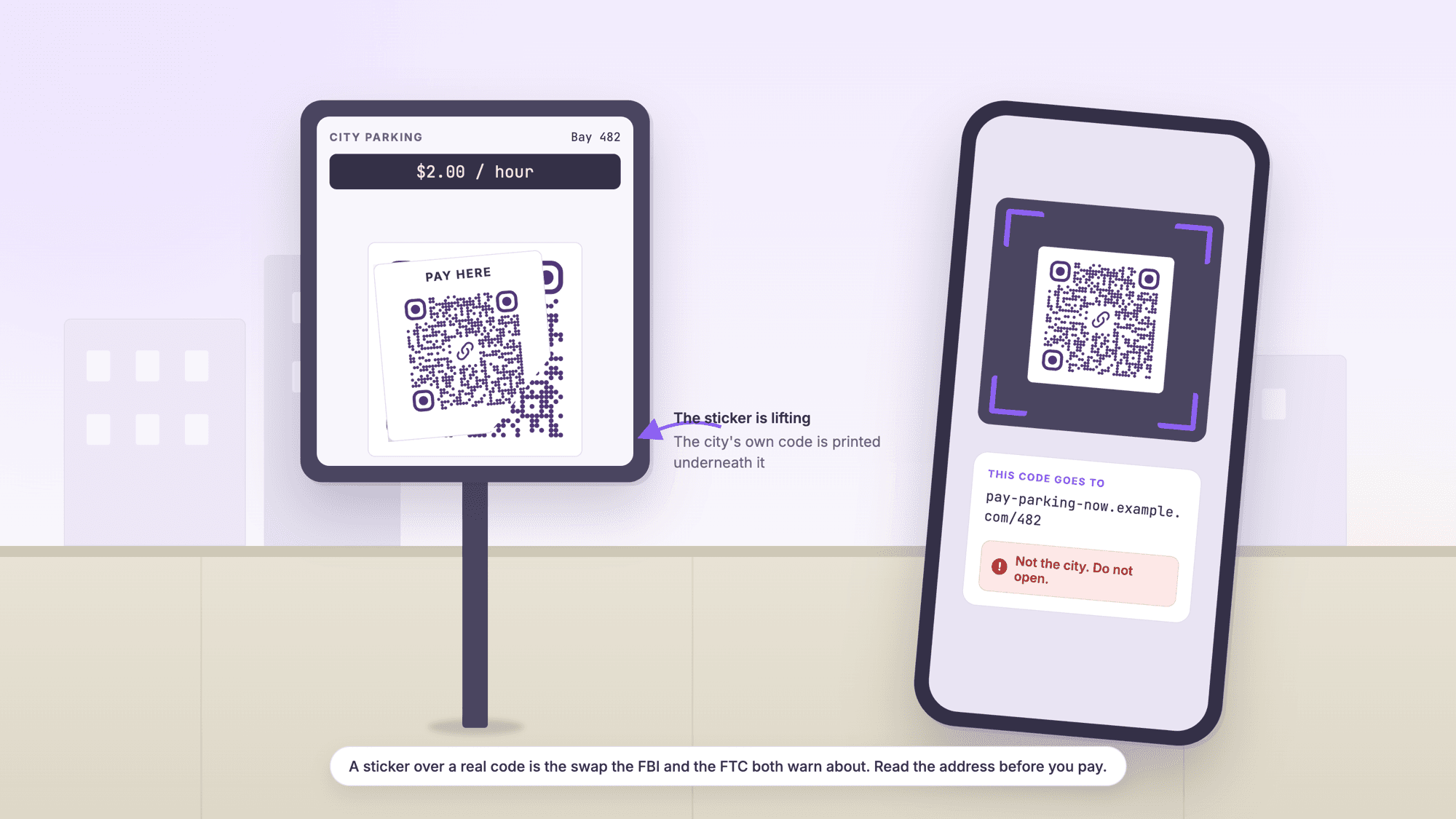
The two common attacks are a sticker and a message. A sticker goes over a real code in a public place, usually where people pay. A message arrives by text or email with a code and a reason to hurry.
You cannot tell a good code from a bad one by looking at it. Two links that differ by a single letter produce patterns that no person can tell apart. The numbers are further down this page.
Read the address first, every time money or a login is involved. Your phone shows the address before it opens it. A reader like our online QR scanner shows it and never opens it at all.
When in doubt, do not scan at all. Type the company's address yourself, or use the app you already have. A parking meter and a restaurant bill both have a website you can reach without a camera.
What quishing is, and why it works so well
Quishing is phishing with the link hidden inside a square instead of written out. Everything else about it is old: a fake page, a sense of urgency, and a form that captures whatever you type.
The hiding is what makes it effective. A phishing email shows its link in the status bar when you hover, and plenty of people have learned to check. A QR code shows nothing. The address is only revealed after the camera has read it, in a small banner most people tap without reading, and on a phone the address bar truncates anything long. A scam page at pay-northwind-parking.com looks the same as the real one in a notification that shows twelve characters.
The FBI's public service announcement I-011822-PSA describes the mechanism plainly: criminals replace legitimate codes with tampered ones, so a victim scans what they believe is a real code and lands on a site built to take login and financial information. The announcement also flags a second use, redirecting a payment that was meant for a business.
One more reason it works: the QR code arrived in most people's lives during the pandemic, attached to menus and check in forms. It carries a residue of officialdom. A sticker on a parking meter reads as municipal, not as something a stranger put there with a peel and press.
Two links, one letter apart, and what the codes look like
You cannot inspect a QR code visually. That is not a matter of practice or care, it is arithmetic. We encoded two addresses that differ by one character, using the same library our generator runs on, at the strongest error correction level.
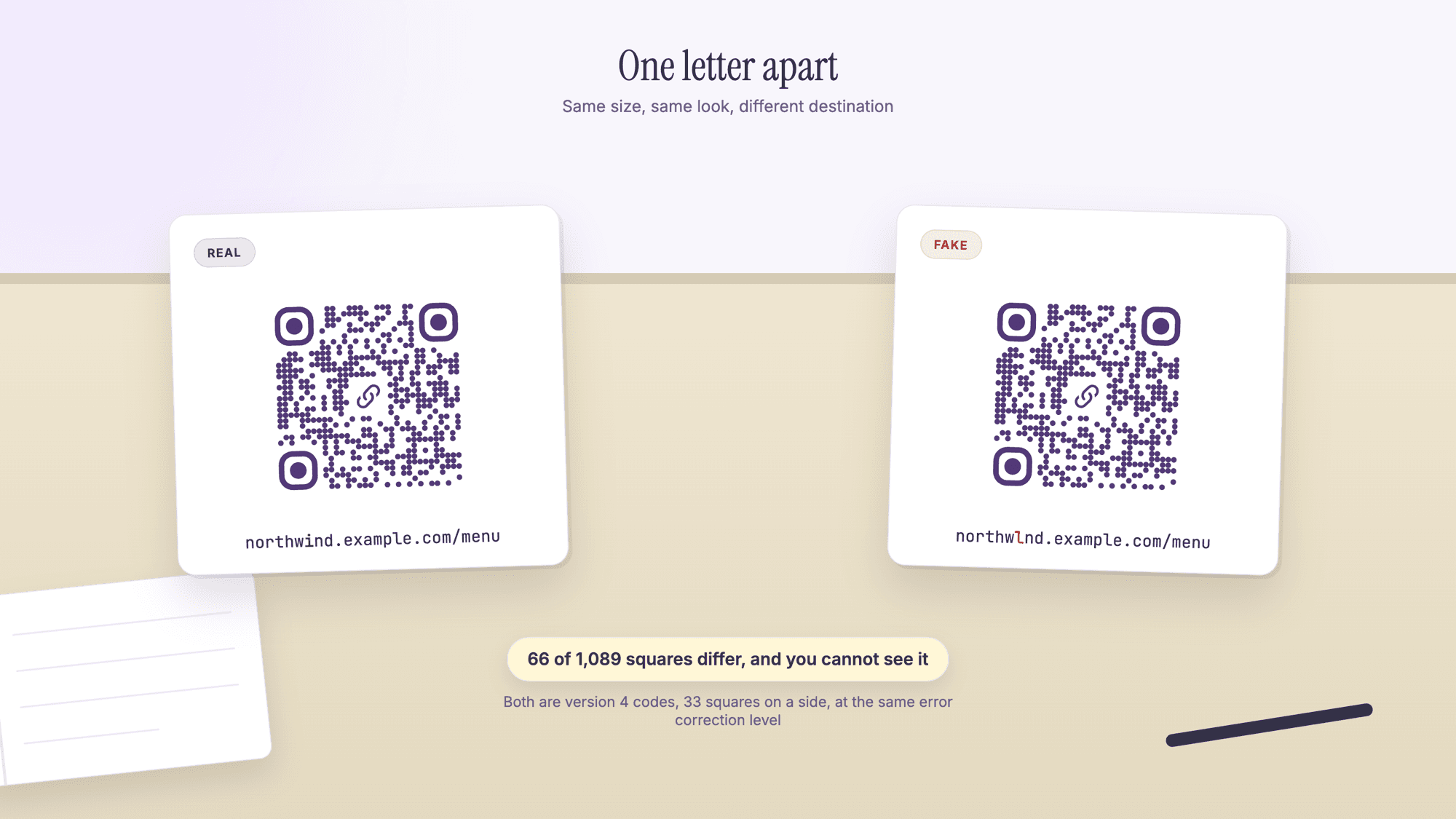
Both codes come out as version 4 symbols, 33 squares on a side, 1,089 squares in total. Between them, 66 squares differ. That is 6 percent of the pattern, scattered across the grid in ones and twos. Printed at the size of a sticker, the two are indistinguishable to a person, and there is no version of looking harder that changes it.
Swap the domain ending instead of a letter and the difference grows to 422 squares, 39 percent of the pattern, and it is still invisible, because a QR code looks like noise either way. The eye has nothing to compare. This is the whole reason the advice is always about the address and never about the picture.
Where fake QR codes actually turn up
Most reported cases fall into a handful of places, and they share one feature: somewhere you already expected to pay or log in.
| Where | The trick | The safe move |
|---|---|---|
| Parking meter or pay station | A sticker over the city's code, sending payment to a lookalike page | Use the city's own app or the number printed on the meter |
| Restaurant table or bill | A sticker on the table tent that collects card details on a fake pay page | Pay at the counter or with the staff terminal when the code asks for a card |
| Text message or email | A missed delivery, a locked account, a suspicious login, all with a code and a deadline | Do not scan. Open the company's site or app yourself |
| Package in the mail | An unexpected parcel with a card telling you to scan to find the sender | Do not scan. Nothing good requires that code |
| Flyer, poster or a charity collection | A code pasted over the original on a public noticeboard | Check for a sticker edge, and donate through the charity's own site |
| Crypto or investment pitch | A code that fills a wallet address, so the transfer goes to the wrong place | Read the whole address and confirm it out of band. Transfers do not reverse |
| Office or public WiFi sign | A code that joins a network with a name close to the real one | Ask staff for the network name, and avoid banking on any public network |
The FTC's alert lists the message versions in the same order we see them reported: a package that could not be delivered, a problem with your account, suspicious activity on your account. All three are pretexts that make you act before you think, and the alert says so directly.
How to read a QR code before you open it
Reading a code without opening it takes about five seconds and it is the single habit that prevents nearly all of this.
On a phone camera. Point the camera and stop. Apple's own instructions for iPhone are to hold the device so the code appears, then tap the link to open the content, which means the link appears first and waits for you. Google's help page for Camera from Google describes the same pause: a banner appears after the code is scanned and you click it to continue. Read the domain in that banner before your thumb moves.
On a computer or when the code is in a message. Take a screenshot and drop it into a reader that shows the content instead of following it. Our QR code safety check reads the picture inside your browser, prints the full address, and flags link shorteners, plain http addresses and names that are close to a well known brand. Nothing is opened until you press the button yourself, and the picture is never sent to us.
What to look at in the address. Read it from the right of the domain backwards. The part immediately before the first single slash is the site you are going to, and everything after the slash is decoration a scammer controls. A page at northwindcoffee.com.pay-secure.net is on pay-secure.net, not on the coffee shop's site.
Treat a shortened link as unknown. A shortener hides the destination by design, which is fine for a poster and wrong for a payment. If a code that wants money resolves to a shortener, stop there.
Warning signs, in the order they matter
These are the signals that have actually preceded losses, ranked by how reliably they show up.
A sticker. Run a fingernail across the edge of any code you are about to pay through. A printed sign is flat and continuous. A sticker has a lip, a bubble, or a corner that lifts. The FBI's advice is exactly this: check that the code has not been covered with a sticker placed on top of the original.
Urgency. A deadline, a fine, a suspended account, a package that goes back tomorrow. Real organizations rarely need a decision in the next two minutes, and the ones that do have other ways to reach you.
A code you did not go looking for. You expect a code on a menu because you sat down to eat. A code in an unexpected email is a stranger handing you a door.
The page asks for more than the task needs. Paying for parking needs a plate and a card. It does not need your date of birth, your Social Security number, or a one time code from your bank.
A login page that arrived by camera. If a code lands you on a sign in screen for something you already have an account with, close it and open that account the way you normally do.
An address with an extra word. secure-, -pay, -verify, -login and -support bolted onto a brand name are the most common shapes, along with a switched letter, a doubled letter, or a different ending such as .co for .com.
Payments deserve a stricter rule
Everything above is about care. For money, care is not enough, because the loss is immediate and often final.
The rule that removes the risk entirely is to never start a payment from a code you did not bring with you. Use the parking app you already installed. Tap your card on the terminal. Type the restaurant's own domain. The few seconds you save by scanning are not worth the exposure, and the FBI is blunt about the recovery odds: law enforcement cannot guarantee that transferred funds are recovered.
Cryptocurrency is the sharpest version of this. A wallet address filled in from a code is long, unreadable and irreversible once sent. Compare the first and last six characters against a source the sender did not control, and send a small test amount first if the amount is large.
If you already scanned one
Most people who scan a bad code lose nothing, because they left before typing. Work through this in order.
If you only looked at the page, close the tab. Looking at a web page does not hand anything over. Clear the tab and move on.
If you typed a password, change it now on the real site, and change it anywhere else you used the same one. Turn on two factor authentication while you are there.
If you entered card or bank details, call the number on the back of your card and say the details were entered on a fraudulent site. Card networks can block and reissue quickly when they hear it early.
If you approved a login code or a push notification, treat the account as compromised, sign out of all sessions from the account's security page, and change the password.
If anything was installed, remove it and restart the phone. The FBI's guidance is not to install apps from QR codes at all: "Do not download an app from a QR code."
Report it. In the United States, ReportFraud.ftc.gov takes consumer reports and ic3.gov takes internet crime complaints. Reporting is how the pattern gets mapped, and it is quick.
Protecting the QR codes your own business prints
A sticker attack costs the customer money and costs you the relationship. A few habits make your codes harder to swap and easier to check.
Print the address in text under the code. Small, legible, the real domain. It gives customers something to compare and gives you something to point at. It also lets people who refuse to scan reach the same page. Our free QR code generator makes the code itself in a few seconds, with no account and no watermark.
Laminate or print onto the surface. A code under a laminate, printed directly on a tent card, or engraved on a plate is far harder to cover cleanly than a paper label.
Put the code on your own domain. A code that resolves to your domain can be checked by a customer at a glance. A code that resolves to a shortener cannot, and it trains your customers to accept exactly the thing a scammer needs them to accept.
Walk the floor. Check the codes on tables, doors, counters and windows on a schedule, the same way you check the register. A member of staff who knows what the real code looks like from the back of the card spots a swap in a second.
Use a code you can change. If a printed code has to be redirected because the destination moved or was abused, a static code means a reprint. A dynamic code is edited instead. On QRCodePrime, every free account includes 10 dynamic QR codes, free for life, with scan analytics, no credit card required, no watermarks, and no ads or interstitial pages on the redirect. Static codes stay unlimited and free with no account. The difference is laid out in our guide to static and dynamic QR codes, and the free dynamic QR code generator is where you make one.
Test what you print before it goes out. A code that fails in the field sends people looking for another way in, and that is the moment a fake one gets used. Our walkthrough on testing a QR code before printing covers the proof, and what to do when a QR code will not scan covers the ones already out there.
Mistakes that get people caught
Tapping the banner without reading it. The address is right there for a second and a half. Read it.
Trusting the setting instead of the code. A code inside a restaurant is not verified by the restaurant. Stickers are cheap and nobody checks the table.
Assuming a padlock means safe. Https means the connection is encrypted, not that the site is honest. Scam pages have certificates too.
Scanning a code from a text message because the sender knows your name. Names, order numbers and last four digits leak constantly. They prove nothing.
Using a random scanner app. Many exist to show ads or collect data, and some open links immediately. The camera you already own, or a reader that shows the address and stops, is a better tool.
Reusing passwords. The fake login page is only worth building because the password it captures works somewhere else.
Sources
- FBI Internet Crime Complaint Center, alert I-011822-PSA: Cybercriminals Tampering with QR Codes to Steal Victim Funds (January 18, 2022)
- Federal Trade Commission: Scammers hide harmful links in QR codes to steal your information (December 6, 2023)
- Apple Support: Scan a QR code with your iPhone or iPad
- Google Help: Scan QR codes on Camera from Google
- Denso Wave: Error correction feature
Common questions about QR code scams
Can a QR code hack my phone just by scanning it?▾
Reading the code is not the dangerous part. A QR code holds a short piece of text, almost always a web address, and your phone shows it before it does anything. The risk starts when the address is opened and you type in a password or card details, or install something from it.
How can I tell if a QR code is a scam?▾
Not by looking at it. Two addresses one letter apart make patterns that differ in about 6 percent of their squares, which no person can see. Judge the address instead: read the domain before you open it, feel the printed code for a sticker edge, and be suspicious of any code that arrived with a deadline attached.
What is quishing?▾
Quishing is phishing that uses a QR code to carry the link. The fake page, the urgency and the form that captures your details are the same as any phishing attack. The code simply hides the address until after the camera has read it, which is why so few people check it.
Are QR codes on parking meters safe?▾
Parking meters are one of the places the FTC has named for sticker attacks, where a scammer covers the city's code with their own. Use the parking app you already have or the phone number printed on the meter. If you do scan, check that the address belongs to the city or its named payment provider before entering a card.
What should I do if I scanned a suspicious QR code?▾
If you only looked at the page, close it and nothing has been given away. If you typed a password, change it there and anywhere else you used it. If you entered card details, call your bank now. If you installed anything, remove it and restart. In the United States you can report it at ReportFraud.ftc.gov and ic3.gov.
How do I see where a QR code goes without opening it?▾
Take a screenshot or a photo of the code and open it in a reader that shows the content instead of following it. The QRCodePrime safety check prints the full address, points out link shorteners and lookalike names, and opens nothing until you choose to. The picture is read in your browser and never sent to us.
Is it safe to scan a QR code from a text message?▾
Treat it as unsafe unless you asked for it. The FTC's advice is not to scan a code in an unexpected message, especially one that pushes you to act immediately. If the message might be real, reach the company through its own app or a website address you type yourself.
How do I stop someone putting a fake QR code over mine?▾
Print the real address in text under the code so customers can compare, print onto the surface or laminate it so a label will not sit flat, keep the code on your own domain rather than a shortener, and check your printed codes on a schedule. Staff who know what the real one looks like catch a swap quickly.
See the full address, and the warning signs, without following the link. Free, no signup, nothing leaves your browser.
Check a QR code before you open itPublished by
QRCodePrime Team
Guides on making, printing and scanning QR codes
Published by the team behind the free QRCodePrime generator and scanner. The example codes in our illustrations are real codes made with the generator, numbers are either computed by us or quoted from a source we name, and the sources are linked at the end of each article. Found a mistake? Email hello@qrcodeprime.com and we will fix it.