
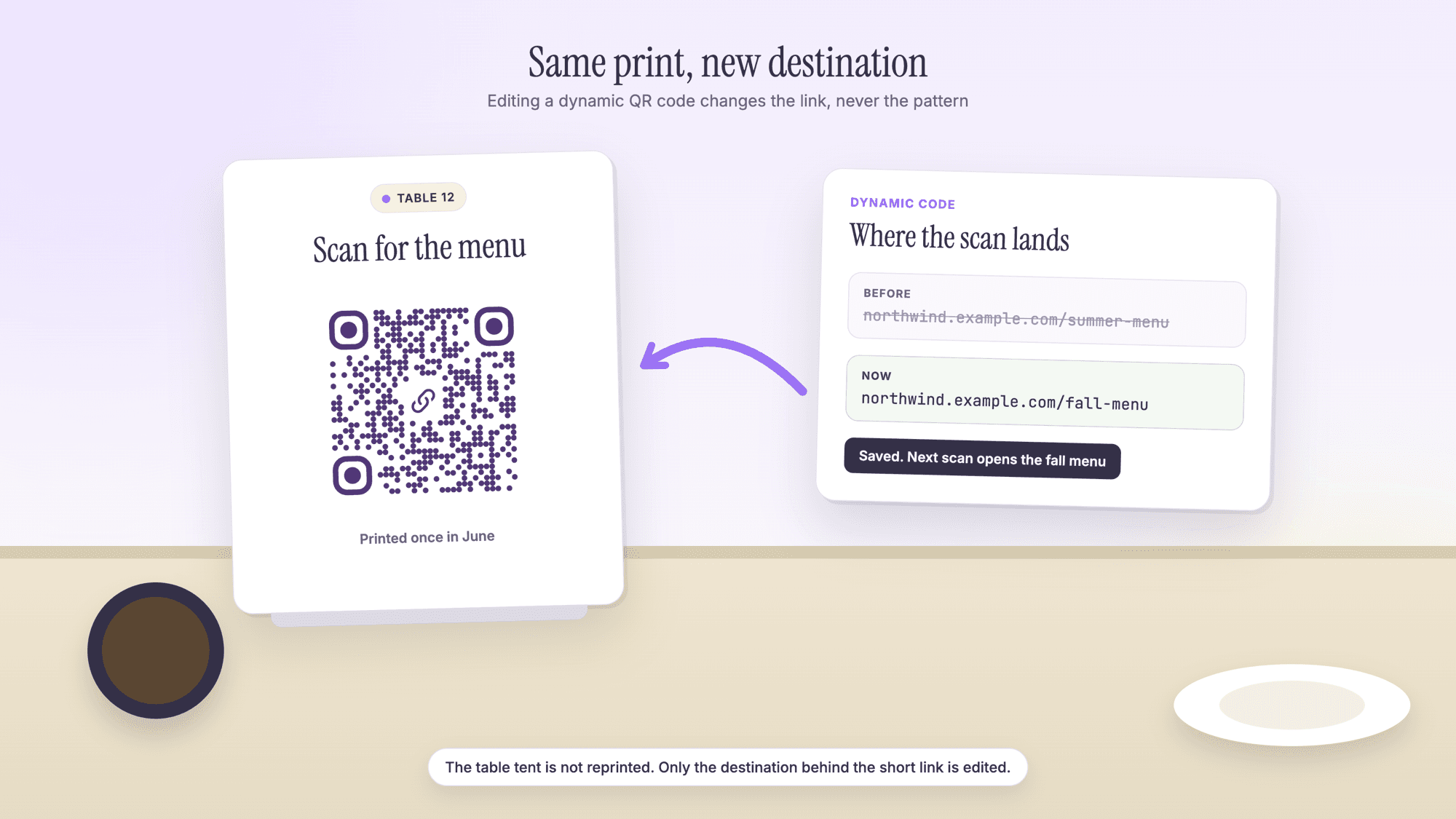
How to Edit a QR Code After Printing
Last updated Sep 27, 2026
On this page
- The short version
- First, find out which kind of code you have
- How to edit a dynamic QR code
- What you can change, and what you cannot
- Why a static QR code cannot be edited
- Four ways to change what a printed static code does
- A dynamic code is also a small code
- Editing a code you made somewhere else
- Where editable codes earn their keep
- Mistakes to avoid when you edit
- Sources
- Common questions about editing a QR code
You can edit a QR code after printing only if it is a dynamic code. A dynamic code holds a short link, and you change where that link forwards from your account, so the printed pattern stays exactly the same. A static code holds the destination itself and cannot be changed: a new destination means a new pattern. With a static code you can still change the page it opens.
So the first job is to find out which kind you printed, and that takes about a minute. After that the route is clear: edit the destination if the code is dynamic, or use one of four workarounds if it is static. Both are below, along with what editing can and cannot change, and the size numbers we worked out for each kind of code.
The short version
Dynamic code: log in to the tool that made it, change the destination link, save. The print does not change and the next scan lands on the new page.
Static code: the pattern is the data. You cannot edit it, but you can change the page at that address, forward the old address from your own website, cover the code with a sticker, or reprint.
Not sure which one you have? Read the code with our online QR scanner and look at the address inside. Your own page address means static. A short link on a QR tool's domain means dynamic.
Codes that are not links (WiFi, contact cards, plain text, email, SMS, phone, location) are static by nature. Changing them always means a new code.
On QRCodePrime, static QR codes are unlimited and free with no account, and every free account includes 10 dynamic QR codes, free for life, with scan analytics. No credit card required, no watermarks, and no ads on the site or on the redirect.
First, find out which kind of code you have
The address inside the pattern tells you whether the code can be edited. Open the scanner, upload a photo or a screenshot of the printed code, and read what comes back. Nothing is opened, so this is also safe for a code you did not make yourself.
| What the scanner shows | What kind of code it is | Can you edit it? |
|---|---|---|
| Your own page address, such as northwind.example.com/menu | Static URL code | No. Change the page, forward the address, or replace the code |
| qrcodeprime.com/api/r/ followed by 8 characters | Dynamic code made on QRCodePrime | Yes, from your dashboard |
| A short link on another QR tool's domain | Dynamic code made with that tool | Yes, but only inside the account that made it |
| A link shortener address | Static code that points at a short link | Only if that shortener account lets you change the destination |
| Text starting with WIFI:, BEGIN:VCARD, mailto:, tel:, SMSTO: or geo: | Static code, not a link at all | No. The details are inside the pattern |
If you made the code yourself and cannot remember where, the domain of the short link is the clue. It belongs to the tool that holds the account.
How to edit a dynamic QR code
Editing a dynamic code means changing one field, the destination link, in the account that created the code. On QRCodePrime it takes six steps.
Step 1. Log in and open your dashboard. Every code you saved is listed there, and dynamic ones carry a Dynamic badge.
Step 2. Find the code you printed. Each dynamic code shows its current destination on the line under its name. If you have several, open the short link with the button beside the code to confirm which page it goes to now.
Step 3. Select the pencil beside the destination. The destination turns into a text field.
Step 4. Paste the new link, with https:// at the front. Copy it from the address bar of the page you want people to reach, so a typing slip cannot get in.
Step 5. Confirm with the check mark. The change is saved at once.
Step 6. Scan the printed code. Use the real print, not the picture on your screen, and check that the new page opens. Then try it on a second phone.
The edit applies to the next scan. Our redirect answers with the status code that the HTTP standard, RFC 9110, defines for exactly this case: "Since the redirection might be altered on occasion, the client ought to continue to use the target URI for future requests." We also mark every redirect as not to be stored, so a phone that scanned the code yesterday asks again today and gets the new destination.
Need a dynamic code in the first place? The free dynamic QR code generator makes one in about a minute. A free account includes 10 dynamic QR codes, free for life, with scan analytics, no credit card required and no watermarks.
What you can change, and what you cannot
Editing changes where the scan lands and nothing else. It helps to be exact about the rest before you promise a client that a printed piece can be fixed.
| Part of the code | Can it change after printing? |
|---|---|
| The destination page | Yes, as often as you like, on a dynamic code |
| The printed pattern | No. It holds the short link, and the short link never changes |
| Colors, dot shape and logo on the print | No. Ink is ink. Only new prints carry a new design |
| The short link itself | No. Changing it would mean a different pattern |
| The kind of code, link to WiFi for example | No. A WiFi code is not a link, so it cannot sit behind a redirect |
| A static code into a dynamic one | No. Make a new dynamic code and replace the print |
On QRCodePrime the types that can be dynamic are the ones that open a link: website URLs, WhatsApp chats, Facebook pages, YouTube videos and Spotify links.
Why a static QR code cannot be edited
A static code has no link to a server that could be updated. The pattern is the message, so a different message is a different pattern, and ink on paper does not rearrange itself.
We measured how different. Using the same encoding library as our generator, at the same error correction level, we encoded pairs of links that differ in a small way and counted the squares that changed.
| The edit | Code size | Squares that change |
|---|---|---|
| /menu becomes /meny, one letter | 33 by 33, 1,089 squares | 58, or 5.3 percent |
| /menu-2025 becomes /menu-2026, one digit | 37 by 37, 1,369 squares | 96, or 7.0 percent |
| /summer becomes /winter | 33 by 33, 1,089 squares | 78, or 7.2 percent |
Changing a single digit moves 96 squares scattered across the whole code. Nobody fixes that with a pen. The error correction built into every QR code also works against you here: in Denso Wave's words, "QR Code has error correction capability to restore data if the code is dirty or damaged." A hand edit looks like damage, so the reader restores the original link or fails to read the code at all.
Four ways to change what a printed static code does
You cannot change the address inside a static code, but you control what happens at that address. These four options are in order of cost, lowest first.
1. Keep the address, change the page. If the code points to northwind.example.com/menu, put the new menu at that same address. This is free and instant, and it is the reason to print addresses that describe a purpose (menu, hours, book) and not a date or a campaign.
2. Forward the old address from your own website. Most website builders and hosts let you add a redirect from one page to another. The HTTP standard offers a permanent form, status 301, for a page that "has been assigned a new permanent URI", and a temporary form, status 302, for a page that "resides temporarily under a different URI". Use the permanent one when the old page is never coming back. This only works while you own the domain.
3. Cover the code with a sticker. Print the new code at the same size as the old one, on matte label stock, and place it squarely over the old pattern with its white margin intact. Make the new one dynamic, so this is the last sticker. One caution: a sticker over a code is also what a scam looks like, which our guide to QR code scams covers, so keep your name or logo on the label.
4. Reprint. Sometimes the honest answer. Before the new run, go through the four pass test for a QR code before printing.
If none of the four is possible because the domain is gone or the code came from a tool that switched it off, see what to do when a QR code has expired or stopped working.
A dynamic code is also a small code
A dynamic code is the same size no matter how long the destination is, because the pattern only ever holds the short link. That is a print advantage people rarely mention.
A QRCodePrime short link is always 38 characters, which makes a code of 37 squares per side. We encoded four common destinations as static codes for comparison, then worked out the smallest width each can be printed at, using the method in Denso Wave's own worked example, four printer dots per square plus a margin of four squares on every side, applied to a 300 dpi printer.
| What the code holds | Characters | Squares per side | Smallest print width, margin included |
|---|---|---|---|
| Dynamic short link, any destination | 38 | 37 | 15.2 mm (0.60 in) |
| Short page on your own domain | 32 | 33 | 13.9 mm (0.55 in) |
| Menu PDF in an uploads folder | 82 | 49 | 19.3 mm (0.76 in) |
| Document share link | 83 | 49 | 19.3 mm (0.76 in) |
| Campaign link with tracking tags | 99 | 57 | 22.0 mm (0.87 in) |
Put the 99 character tracked link behind a dynamic code and the pattern drops from 57 squares per side to 37. In the same 1.2 inch slot, each square grows from 0.018 inches to 0.027 inches, which is 50 percent larger and gives every camera more to work with. The relationship between length and size is covered in full in the QR code character limit reference.
Editing a code you made somewhere else
A dynamic code can only be edited inside the tool that owns its short link. No other tool, ours included, can reach into that link and change it.
That has one practical consequence. If the tool that made your code charges to keep it running, the right to edit ends when the account does. Scanova's pricing page, read in September 2026, puts it plainly: "Your Dynamic QR Code will stop working once the free trial ends." If you are in that position, the repair is a new code and a sticker or a reprint, as in the section above.
When you replace it, make the new code somewhere that will not switch it off. On QRCodePrime every free account includes 10 dynamic QR codes, free for life, with scan analytics. No credit card required, no watermarks, and no ads or waiting pages on the redirect. The full comparison of the two kinds is on static versus dynamic QR codes.
Where editable codes earn their keep
An editable code pays for itself wherever the print outlives the page. A few places where that is the normal case:
Menus and table tents. Seasons change and the tents stay. See QR codes for restaurants.
Yard signs and listing sheets. One sign, many listings over its life. See QR codes for real estate.
Packaging. A box printed in the tens of thousands cannot be recalled because a web page moved.
Flyers and mailers with a campaign page. When the campaign ends, point the code at the next one. See QR codes for marketing.
For a link that will never change, such as your homepage, a static code from the free QR code generator is still the simplest choice. It depends on nobody and needs no account.
Mistakes to avoid when you edit
Pasting a link without https. Some phones show a bare address as plain text and offer no link to tap. Copy the full address from the browser.
Not scanning the print afterward. The dashboard saying saved is not the same as the table tent opening the right page. Scan the real thing.
Editing the wrong code. With several similar codes in one account, confirm which is which by opening each short link before changing anything.
Deleting a code that is still in print. A deleted dynamic code stops forwarding, and every printed copy then lands on a page that says the code is not active. Edit the destination instead.
Pointing at a page that needs a login. A destination that works for you because you are signed in can show a login wall to everyone else. Test in a private browser window.
Forgetting the old page. People may have bookmarked or shared it. If the old page is gone for good, forward it to the new one on your website as well.
Sources
- IETF RFC 9110, HTTP Semantics (June 2022): the 301 and 302 redirect status codes
- Denso Wave: Error correction feature
- Denso Wave: Point for determining the code area, including module size and the four module margin
- Scanova: pricing page and its questions about dynamic codes, read September 2026
Common questions about editing a QR code
Can you edit a QR code after it is printed?▾
Yes, if it is a dynamic QR code. A dynamic code holds a short link, and you change where that link forwards from the account that made it, so the print stays the same. A static code cannot be edited, because the destination is stored in the pattern itself. You can still change the page at that address or forward it from your own website.
How do I change the link on a QR code?▾
Log in to the tool that made the code, open the dynamic code in your dashboard, replace the destination link and save. On QRCodePrime you select the pencil beside the destination, paste the new link with https at the front, and confirm. The next scan of the printed code opens the new page.
How do I know if my QR code is static or dynamic?▾
Read it with a scanner that shows the address without opening it, such as the QRCodePrime online scanner. If the code contains your own page address, it is static. If it contains a short link on a QR tool's domain, it is dynamic and can be edited in that tool's account.
Can I turn a static QR code into a dynamic one?▾
No. The two hold different data, so they are different patterns. Make a new dynamic code and replace the printed one, with a sticker or on the next print run. Until then, you can change what the static code opens by updating the page at its address.
Can I edit a WiFi or contact QR code?▾
No. WiFi, contact card, text, email, SMS, phone and location codes store their details inside the pattern and have no link to forward. When the password or the phone number changes, make a new code. They are free and unlimited on QRCodePrime with no account.
Does editing a dynamic QR code change how it looks?▾
No. The pattern holds only the short link, and the short link never changes. That is why the same printed code keeps working after any number of edits. On QRCodePrime the short link is always 38 characters, so the code is always 37 squares per side.
Is it free to edit a QR code?▾
On QRCodePrime, yes. Every free account includes 10 dynamic QR codes, free for life, with scan analytics, and you can change each destination as often as you like. No credit card is required, there are no watermarks, and there are no ads on the redirect. Static QR codes are unlimited and free with no account.
How long does an edit take to work?▾
On QRCodePrime the change applies to the next scan. The redirect is marked as not to be stored, so phones ask for the destination again on every scan. Scan the printed code right after saving to confirm the new page opens.
10 dynamic QR codes with every free account, free for life, with scan analytics. No credit card, no watermarks, no ads on the redirect.
Make a QR code you can editPublished by
QRCodePrime Team
Guides on making, printing and scanning QR codes
Published by the team behind the free QRCodePrime generator and scanner. The example codes in our illustrations are real codes made with the generator, numbers are either computed by us or quoted from a source we name, and the sources are linked at the end of each article. Found a mistake? Email hello@qrcodeprime.com and we will fix it.