
QR Code Size Chart: 40 Versions, Print Floors (2026)
Last updated Nov 1, 2026
On this page
- How to read the chart
- The chart: squares, capacity and print floor for every version
- Which version everyday content lands on
- Floors for other printers
- Starting widths by reading distance
- The margin for each version
- What the chart does not cover
- How the chart was made
- Common mistakes when using a size chart
- Sources
- Common questions about the QR code size chart
This QR code size chart lists all 40 versions of the QR code with the number of squares per side, how many characters each holds at the four error correction levels, and the smallest print at which a 300 dpi and a 600 dpi printer can hold four dots per square, margin included. Every figure was computed on November 1, 2026 with the encoder this site's generator uses, and the method is at the end.
The chart exists because the published capacity tables stop at characters, and the sizing guides stop at one minimum for every code. A print shop, a designer or a sign maker needs the two joined: this content lands on this version, which has this many squares, which needs this much width on this printer. The QR code size guide explains how to use the floors for a real placement; this page is the reference it draws on.
How to read the chart
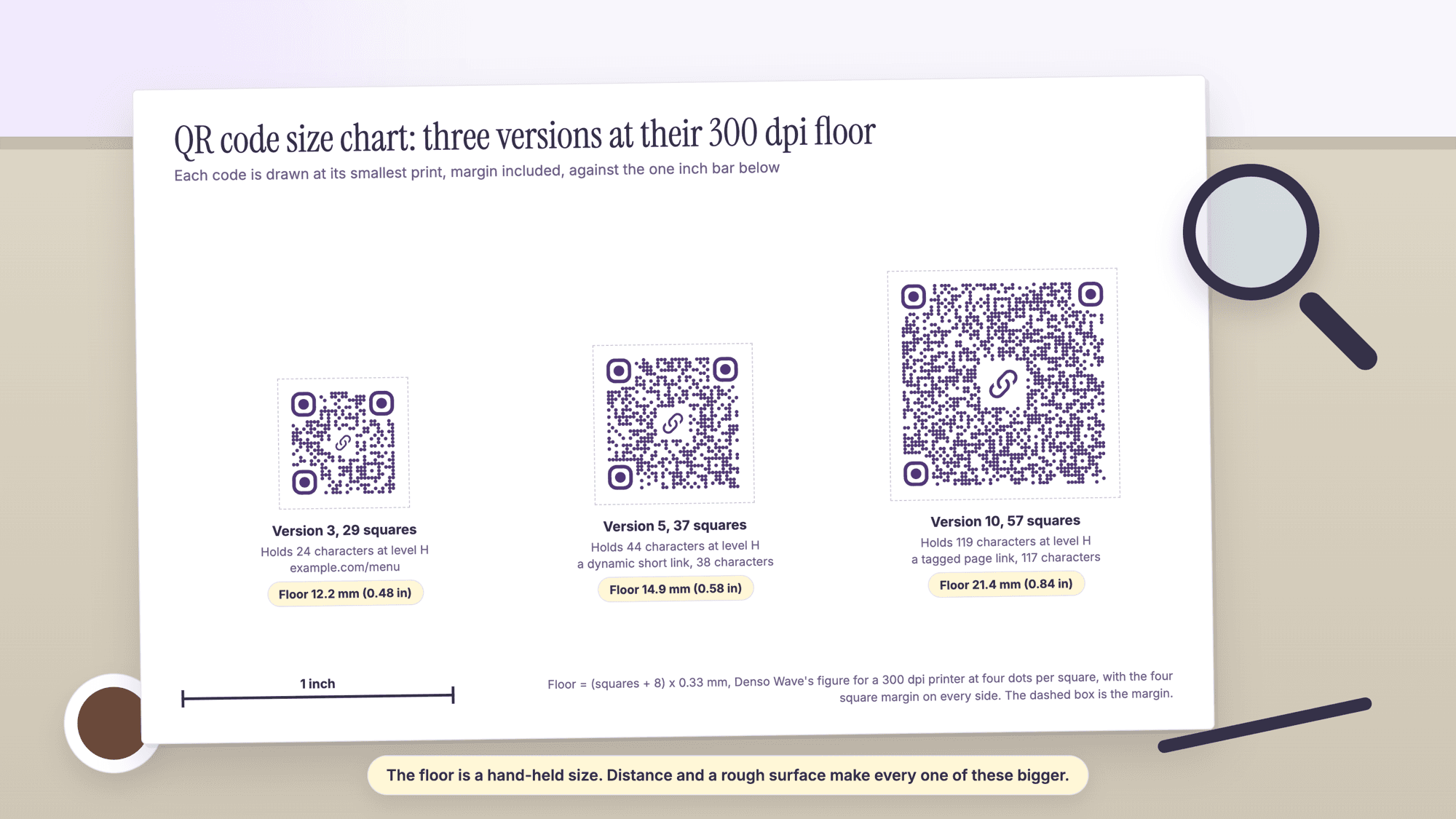
Each row is one version. Denso Wave's version page gives the rule that builds the first two columns: "Each higher version number comprises 4 additional modules per side," from 21 squares at version 1 to 177 at version 40. The capacity columns are the longest string of ordinary text (byte mode, which is what a web address uses) that still fits that version at each level; the generator uses level H everywhere, so the H column is the one that applies to a code made here. The floor columns add the four square margin on every side, as Denso Wave requires ("QR Code requires a four-module wide margin at all sides of a symbol"), and multiply by the square size from Denso Wave's printer table: 0.33 mm at 300 dpi and 0.17 mm at 600 dpi, four dots per square.
A floor is the smallest print at which the printer can still form every square. It is a hand-held size for a clean print on a flat surface, not the size to print for a code read across a room; the distance section of the size guide covers that.
The chart: squares, capacity and print floor for every version
| Version | Squares per side | Characters at H | At Q | At M | At L | Floor at 300 dpi, with margin | Floor at 600 dpi, with margin |
|---|---|---|---|---|---|---|---|
| 1 | 21 | 7 | 11 | 14 | 17 | 9.6 mm (0.38 in) | 4.9 mm (0.19 in) |
| 2 | 25 | 14 | 20 | 26 | 32 | 10.9 mm (0.43 in) | 5.6 mm (0.22 in) |
| 3 | 29 | 24 | 32 | 42 | 53 | 12.2 mm (0.48 in) | 6.3 mm (0.25 in) |
| 4 | 33 | 34 | 46 | 62 | 78 | 13.5 mm (0.53 in) | 7.0 mm (0.27 in) |
| 5 | 37 | 44 | 60 | 84 | 106 | 14.9 mm (0.58 in) | 7.7 mm (0.30 in) |
| 6 | 41 | 58 | 74 | 106 | 134 | 16.2 mm (0.64 in) | 8.3 mm (0.33 in) |
| 7 | 45 | 64 | 86 | 122 | 154 | 17.5 mm (0.69 in) | 9.0 mm (0.35 in) |
| 8 | 49 | 84 | 108 | 152 | 192 | 18.8 mm (0.74 in) | 9.7 mm (0.38 in) |
| 9 | 53 | 98 | 130 | 180 | 230 | 20.1 mm (0.79 in) | 10.4 mm (0.41 in) |
| 10 | 57 | 119 | 151 | 213 | 271 | 21.4 mm (0.84 in) | 11.1 mm (0.44 in) |
| 11 | 61 | 137 | 177 | 251 | 321 | 22.8 mm (0.90 in) | 11.7 mm (0.46 in) |
| 12 | 65 | 155 | 203 | 287 | 367 | 24.1 mm (0.95 in) | 12.4 mm (0.49 in) |
| 13 | 69 | 177 | 241 | 331 | 425 | 25.4 mm (1.00 in) | 13.1 mm (0.52 in) |
| 14 | 73 | 194 | 258 | 362 | 458 | 26.7 mm (1.05 in) | 13.8 mm (0.54 in) |
| 15 | 77 | 220 | 292 | 412 | 520 | 28.1 mm (1.10 in) | 14.5 mm (0.57 in) |
| 16 | 81 | 250 | 322 | 450 | 586 | 29.4 mm (1.16 in) | 15.1 mm (0.60 in) |
| 17 | 85 | 280 | 364 | 504 | 644 | 30.7 mm (1.21 in) | 15.8 mm (0.62 in) |
| 18 | 89 | 310 | 394 | 560 | 718 | 32.0 mm (1.26 in) | 16.5 mm (0.65 in) |
| 19 | 93 | 338 | 442 | 624 | 792 | 33.3 mm (1.31 in) | 17.2 mm (0.68 in) |
| 20 | 97 | 382 | 482 | 666 | 858 | 34.6 mm (1.36 in) | 17.9 mm (0.70 in) |
| 21 | 101 | 403 | 509 | 711 | 929 | 36.0 mm (1.42 in) | 18.5 mm (0.73 in) |
| 22 | 105 | 439 | 565 | 779 | 1,003 | 37.3 mm (1.47 in) | 19.2 mm (0.76 in) |
| 23 | 109 | 461 | 611 | 857 | 1,091 | 38.6 mm (1.52 in) | 19.9 mm (0.78 in) |
| 24 | 113 | 511 | 661 | 911 | 1,171 | 39.9 mm (1.57 in) | 20.6 mm (0.81 in) |
| 25 | 117 | 535 | 715 | 997 | 1,273 | 41.3 mm (1.62 in) | 21.3 mm (0.84 in) |
| 26 | 121 | 593 | 751 | 1,059 | 1,367 | 42.6 mm (1.68 in) | 21.9 mm (0.86 in) |
| 27 | 125 | 625 | 805 | 1,125 | 1,465 | 43.9 mm (1.73 in) | 22.6 mm (0.89 in) |
| 28 | 129 | 658 | 868 | 1,190 | 1,528 | 45.2 mm (1.78 in) | 23.3 mm (0.92 in) |
| 29 | 133 | 698 | 908 | 1,264 | 1,628 | 46.5 mm (1.83 in) | 24.0 mm (0.94 in) |
| 30 | 137 | 742 | 982 | 1,370 | 1,732 | 47.9 mm (1.88 in) | 24.7 mm (0.97 in) |
| 31 | 141 | 790 | 1,030 | 1,452 | 1,840 | 49.2 mm (1.94 in) | 25.3 mm (1.00 in) |
| 32 | 145 | 842 | 1,112 | 1,538 | 1,952 | 50.5 mm (1.99 in) | 26.0 mm (1.02 in) |
| 33 | 149 | 898 | 1,168 | 1,628 | 2,068 | 51.8 mm (2.04 in) | 26.7 mm (1.05 in) |
| 34 | 153 | 958 | 1,228 | 1,722 | 2,188 | 53.1 mm (2.09 in) | 27.4 mm (1.08 in) |
| 35 | 157 | 983 | 1,283 | 1,809 | 2,303 | 54.5 mm (2.14 in) | 28.1 mm (1.10 in) |
| 36 | 161 | 1,051 | 1,351 | 1,911 | 2,431 | 55.8 mm (2.20 in) | 28.7 mm (1.13 in) |
| 37 | 165 | 1,093 | 1,423 | 1,989 | 2,563 | 57.1 mm (2.25 in) | 29.4 mm (1.16 in) |
| 38 | 169 | 1,139 | 1,499 | 2,099 | 2,699 | 58.4 mm (2.30 in) | 30.1 mm (1.18 in) |
| 39 | 173 | 1,219 | 1,579 | 2,213 | 2,809 | 59.7 mm (2.35 in) | 30.8 mm (1.21 in) |
| 40 | 177 | 1,273 | 1,663 | 2,331 | 2,953 | 61.1 mm (2.40 in) | 31.5 mm (1.24 in) |
The version 40 row matches the capacities Denso Wave publishes for byte mode (1,273 at H, 1,663 at Q, 2,331 at M and 2,953 at L), which is the check that the method is sound. Versions 1 to 10 are where almost every link lands; the rest of the chart is for contact cards, WiFi codes with long passwords and plain text, which the guide to how many characters fit in a QR code covers by type.
Which version everyday content lands on
The chart is only useful once the content is placed on it, so the second table encodes common payloads at level H and reads the row. The vCard and the WiFi code were built with the fields the vCard QR code page and the WiFi QR code page produce; the links are examples on reserved example.com domains. A vCard this long belongs on a card read up close, as the QR codes on business cards guide shows.
| Content | Characters | Version | Squares per side | Floor at 300 dpi, with margin |
|---|---|---|---|---|
| Short link on your own domain | 37 | 5 | 37 | 14.9 mm (0.58 in) |
| QRCodePrime dynamic short link | 38 | 5 | 37 | 14.9 mm (0.58 in) |
| WiFi code, network name and a 12 character password | 45 | 6 | 41 | 16.2 mm (0.64 in) |
| A page address, 60 characters | 60 | 7 | 45 | 17.5 mm (0.69 in) |
| Google Forms link | 96 | 9 | 53 | 20.1 mm (0.79 in) |
| The same page address with three UTM tags | 117 | 10 | 57 | 21.4 mm (0.84 in) |
| Plain text, 100 characters | 100 | 10 | 57 | 21.4 mm (0.84 in) |
| vCard with seven fields | 221 | 16 | 81 | 29.4 mm (1.16 in) |
The dynamic short link is the smallest code a long destination can have, because the printed pattern holds the 38 character link and the destination lives behind it; the dynamic QR code generator page makes one, and every free account includes 10 dynamic QR codes, free for life, with scan analytics, no credit card required and no watermarks.
Floors for other printers
The floor is a formula, so any printer resolution can be put through it: square size equals 25.4 mm divided by the dots per inch, times four dots, and the floor equals the squares plus eight times the square size. Denso Wave's table gives the 600, 360 and 300 dpi figures directly and says that "DENSO WAVE recommends for stable operations that each module is made up of 4 or more dots." The 203 dpi row is the same formula applied to the resolution of many thermal label printers; it is a computation, not a figure from Denso Wave's page.
| Printer | Square size at four dots | 29 squares (version 3) | 37 squares (version 5) | 57 squares (version 10) | 81 squares (version 16) |
|---|---|---|---|---|---|
| 600 dpi laser | 0.17 mm | 6.3 mm (0.25 in) | 7.7 mm (0.30 in) | 11.1 mm (0.44 in) | 15.1 mm (0.59 in) |
| 360 dpi | 0.28 mm | 10.4 mm (0.41 in) | 12.6 mm (0.50 in) | 18.2 mm (0.72 in) | 24.9 mm (0.98 in) |
| 300 dpi (most office and photo printers) | 0.33 mm | 12.2 mm (0.48 in) | 14.9 mm (0.58 in) | 21.4 mm (0.84 in) | 29.4 mm (1.16 in) |
| 203 dpi (many label printers), computed | 0.50 mm | 18.5 mm (0.73 in) | 22.5 mm (0.89 in) | 32.5 mm (1.28 in) | 44.5 mm (1.75 in) |
A label printer at 203 dpi needs a code half again as wide as an office printer for the same content.
Starting widths by reading distance
The sizing guides agree on a rule of thumb: the width of the code is about one tenth of the distance it is read from. The rule is stated for a code of about 29 squares, a short link, and the camera reads squares, so the table scales it by the square count divided by 29. These are starting sizes for a test print; the size guide explains why the rule is conservative and how to settle the final width with a proof scanned from the real spot.
| Squares per side | 12 in, in the hand | 3 ft, a table or counter | 5 ft, a shop poster | 10 ft, a window from the sidewalk |
|---|---|---|---|---|
| 25 | 1.0 in | 3.1 in | 5.2 in | 10 in |
| 29 | 1.2 in | 3.6 in | 6 in | 12 in |
| 33 | 1.4 in | 4.1 in | 6.8 in | 14 in |
| 37 | 1.5 in | 4.6 in | 7.7 in | 15 in |
| 45 | 1.9 in | 5.6 in | 9.3 in | 19 in |
| 57 | 2.4 in | 7.1 in | 12 in | 24 in |
| 81 | 3.4 in | 10 in | 17 in | 34 in |
The margin for each version
The margin is four squares on every side, so its width in millimeters depends on the printed size of a square, not on the version. At the 300 dpi floor every margin is 1.3 mm (four squares of 0.33 mm); at a 1 inch print the margin of a 37 square code is 2.8 mm and of a 57 square code 1.8 mm, because the squares are smaller. Scanova's guide states the requirement as the standard puts it: "The ISO 18004 standard says you need a quiet zone (white space) that's at least 4 modules wide on all sides." The SVG the generator downloads carries a margin of 7 percent of the code's width plus whatever the centering leaves, which for a 37 square code is about 2.6 squares; leave extra white space around it in the layout, and read the margin section of the size guide before placing a code on a colored panel.
What the chart does not cover
Four limits. The capacities are for byte mode, which is what a web address, a vCard or a WiFi string uses; digits only or uppercase letters hold more, and the character limit guide has those figures. The floors assume four printer dots per square on a flat, clean surface, so textured stock, a curve or a gloss laminate needs more width. The chart says nothing about the camera, which is why the distance table is a starting point and a test print is the end point: the print test routine for QR codes has the steps and the scanner page reads the exact address inside a proof. And a code made elsewhere at level L lands on a smaller version for the same content and reads the L column.
How the chart was made
Every number came from one script run on November 1, 2026 against the qrcode-generator library, the encoder the generator on this site uses. For each version and level, a string of ordinary characters was grown one character at a time until the encoder moved to the next version; the last length that fit is the capacity (versions 39 and 40 used a bounded search, because growing past the top of version 40 makes the encoder refuse the string). The version 40 results match Denso Wave's published byte capacities. Floors are (squares plus 8) times 0.33 mm for 300 dpi and times 0.17 mm for 600 dpi, rounded to a tenth of a millimeter. Anyone with the library can rerun the method; the no sign-up generator shows the live pattern for any content pasted into it.
Common mistakes when using a size chart
Reading the L column for a code made at H. The generator uses level H, which holds the least per version. A 60 character link is version 7 at H and version 4 at L; the H row is the one to print.
Treating the floor as the size. The floor is where a 300 dpi printer stops forming squares. Distance, surface and the camera all push the real size up.
Forgetting the margin. Every floor in the chart includes four squares of white on each side; a layout that uses the floor for the black pattern alone is eight squares short, which is one of the causes in the guide to a QR code that will not scan.
Scaling a small raster file to the floor. Use the SVG or the PDF the generator downloads for anything printed; a PNG stretched past its pixels blurs the squares.
Sources
- Denso Wave: Information capacity and versions of QR Code
- Denso Wave: Point for setting the module size (printer resolution table)
- Denso Wave: Point for determining the code area (the four module margin)
- Scanova: Minimum QR Code Size (the ISO 18004 quiet zone sentence, read November 1, 2026)
- QRKit: QR Code Size Chart (the only other version table found in the ranking pages, read November 1, 2026)
Common questions about the QR code size chart
What size is a version 1 QR code?▾
Version 1 is 21 squares per side and holds 7 characters of ordinary text at level H, 17 at level L. Its smallest print at 300 dpi, with the four square margin, is 9.6 mm (0.38 inches); at 600 dpi it is 4.9 mm. Almost no web address fits in version 1, which is why a short link lands on versions 3 to 5.
How many squares does a QR code have?▾
Between 21 and 177 per side, depending on the version. Each version adds four squares per side, as Denso Wave's version page states. A 38 character dynamic short link is version 5 with 37 squares, a 60 character page address is version 7 with 45, and a seven field vCard of 221 characters is version 16 with 81.
What is the smallest a QR code can be printed?▾
It depends on the version and the printer. At 300 dpi with four dots per square, the floor is 12.2 mm (0.48 inches) for a 29 square code and 21.4 mm (0.84 inches) for a 57 square code, margin included. A 600 dpi printer halves those figures and a 203 dpi label printer makes them half again as large. These are hand-held floors, not sizes for a code read from a distance.
How much data fits in the largest QR code?▾
Version 40, at 177 squares per side, holds 2,953 characters of ordinary text at level L and 1,273 at level H, the level this site's generator uses. Its floor at 300 dpi is 61.1 mm (2.40 inches) with the margin, and a camera has to resolve 177 squares across it, so in practice a code that large is replaced by a short link to a page.
Does error correction change the size of a QR code?▾
Yes. The same content lands on a higher version at a stronger level, because more of the squares carry correction data. A 60 character link is version 4 at level L and version 7 at level H; the H code has 45 squares instead of 33 and a floor of 17.5 mm instead of 13.5 mm. Level H is what lets a logo sit in the middle and a dirty print still read.
Can I use this chart for a Micro QR code?▾
No. The chart covers the standard QR code, versions 1 to 40. Micro QR is a separate format with its own versions and a two square margin, and the generator on this site does not make it.
Paste the content, watch the pattern, and download the SVG for print. Static QR codes are unlimited and free with no account. Every free account includes 10 dynamic QR codes, free for life, with scan analytics. No credit card, no watermarks.
Make a QR code and see its versionPublished by
QRCodePrime Team
Guides on making, printing and scanning QR codes
Published by the team behind the free QRCodePrime generator and scanner. The example codes in our illustrations are real codes made with the generator, numbers are either computed by us or quoted from a source we name, and the sources are linked at the end of each article. Found a mistake? Email hello@qrcodeprime.com and we will fix it.