
Address QR Code: How to Make One That Opens Maps
Last updated Oct 4, 2026
On this page
- The short version
- Which link to put inside an address QR code
- How to make an address QR code in five steps
- Address, pin or coordinates: what to encode when the street address is not enough
- What opens on iPhone and Android when someone scans it
- How big to print an address QR code
- Where address QR codes earn their keep
- Should an address QR code be static or dynamic?
- Common mistakes that put the pin in the wrong place
- Sources
- Common questions about address QR codes
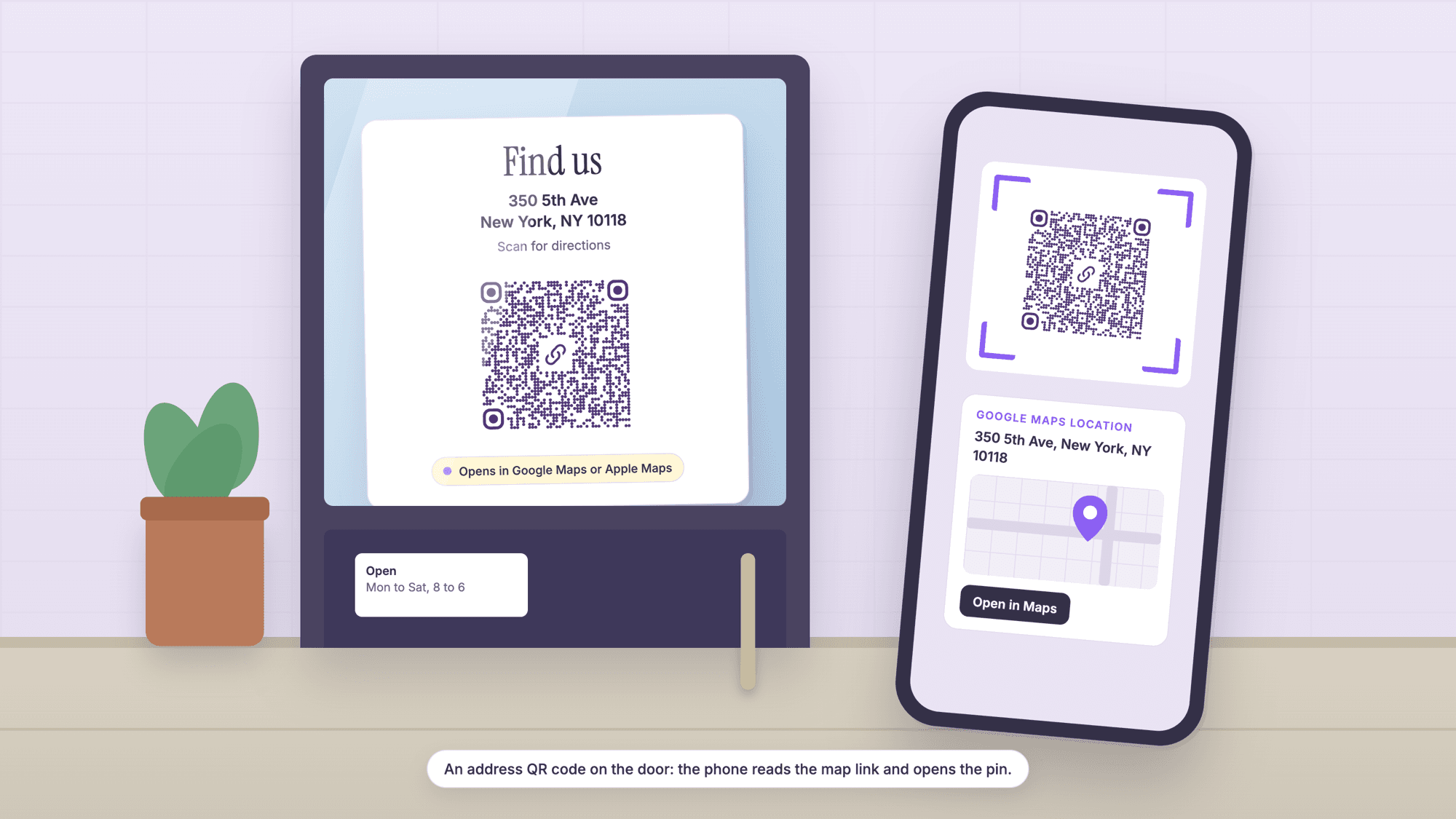
An address QR code is a QR code that holds a map link or a pair of coordinates, so one scan opens the address in the phone's map app with the pin already placed. The most reliable way to make one is to put a Google Maps search link for the address into a free QR code generator, print it with its white margin, and scan the print with an iPhone and an Android phone before you order a sign.
The hard part is choosing what goes inside the code: a street address, a shared Maps link, a dropped pin, coordinates or a Plus Code each print at a different size and behave differently on a phone without the Google Maps app. The comparison below was computed with the same encoder the generator uses.
The short version
For a street address, use Google's documented search link: www.google.com/maps/search/?api=1&query= followed by the address with plus signs for spaces. Paste it into the URL QR code generator. It opens Google Maps on any phone, in the app or in the browser, and no API key is needed.
For an exact spot (a side entrance, a market stall, a trailhead), drop a pin, read the coordinates, and use the location QR code generator, which encodes them as a geo URI, the shortest payload.
Print a search link code at least 0.75 inches wide with its margin, bigger for distance, and test the real print with two phones or the online QR scanner.
On QRCodePrime, static QR codes are unlimited and free with no account, and every free account includes 10 dynamic QR codes, free for life, with scan analytics. No credit card required, no watermarks, and no ads on the site or on the redirect.
Which link to put inside an address QR code
The link decides what opens, how long the payload is, and how large the print has to be. We encoded one address, the Empire State Building at 350 5th Ave, New York, NY 10118, in every common format with the qrcode-generator library at error correction level H, the level the generator uses, and worked out the smallest print width from Denso Wave's guidance of four printer dots per square at 300 dpi and a four-square margin on every side.
| What goes inside the code | Example payload | Characters | Squares per side | Smallest print width, margin included |
|---|---|---|---|---|
| Google Maps search link, address | google.com/maps/search/?api=1&query=350+5th+Ave%2C+New+York%2C+NY+10118 | 83 | 49 | 18.8 mm (0.74 in) |
| Google Maps search link, coordinates | google.com/maps/search/?api=1&query=40.748440%2C-73.985664 | 70 | 49 | 18.8 mm (0.74 in) |
| Google Maps short share link | maps.app.goo.gl/ plus a 17 character code | 41 | 37 | 14.9 mm (0.58 in) |
| Google Maps place link copied from a desktop browser | google.com/maps/place/Empire+State+Building/@40.74844,-73.98566,17z/data=... | 191 | 73 | 26.7 mm (1.05 in) |
| Apple Maps link, address | maps.apple.com/?address=350+5th+Ave,+New+York,+NY+10118 | 63 | 45 | 17.5 mm (0.69 in) |
| Apple Maps link, coordinates and label | maps.apple.com/?ll=40.748440,-73.985664&q=Empire+State+Building | 71 | 49 | 18.8 mm (0.74 in) |
| Plus Code inside a Maps search link | google.com/maps/search/?api=1&query=P27Q%2BMC+New+York | 66 | 49 | 18.8 mm (0.74 in) |
| Geo URI, what the location generator makes | geo:40.748440,-73.985664 | 24 | 29 | 12.2 mm (0.48 in) |
| Dynamic short link, any destination | qrcodeprime.com/api/r/ plus 8 characters | 38 | 37 | 14.9 mm (0.58 in) |
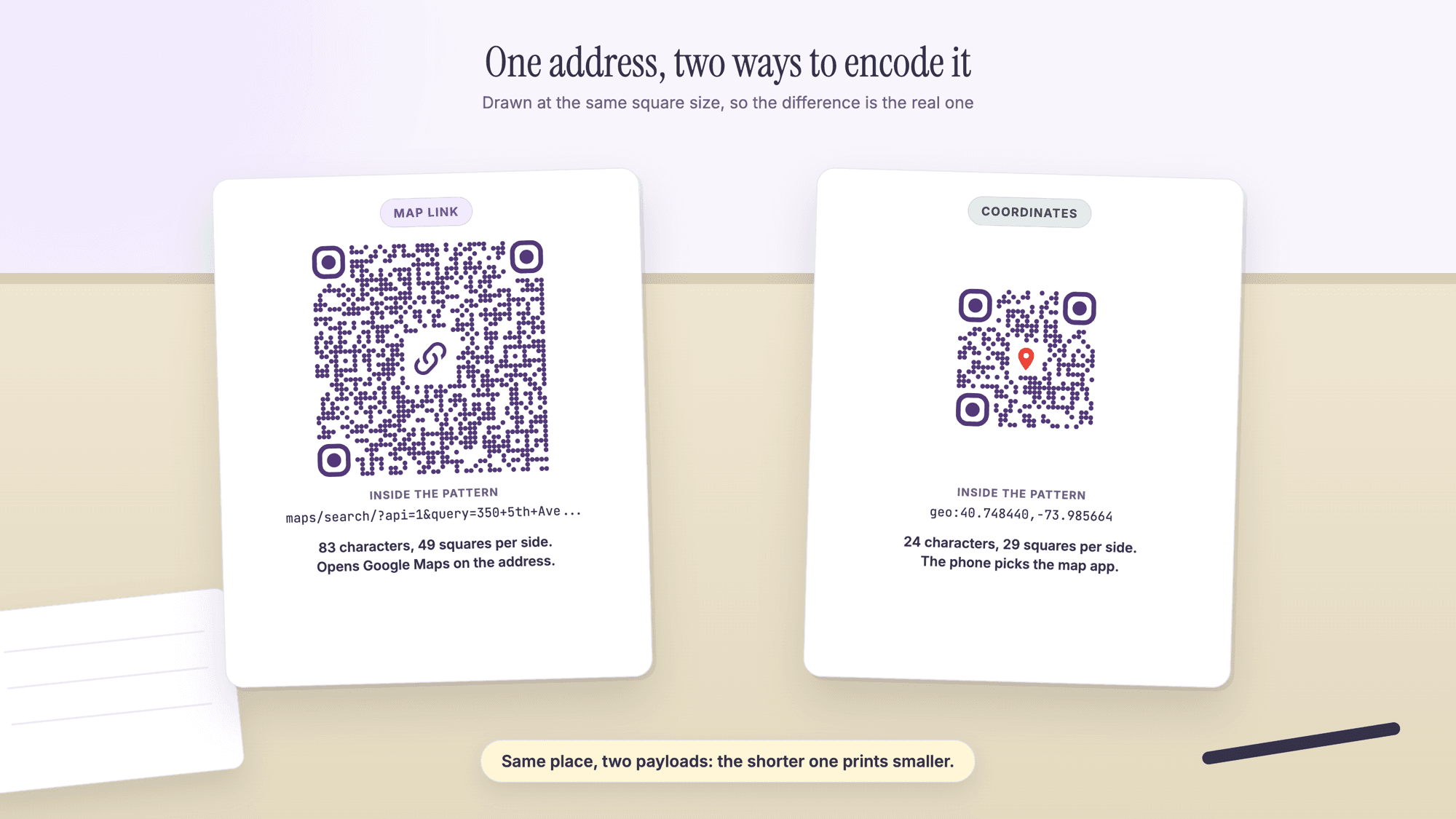
Google documents the search link in its Maps URLs reference. The format is www.google.com/maps/search/?api=1 followed by the parameters, and the query parameter takes "a place name, address, or comma-separated latitude/longitude coordinates". The same page says "You don't need a Google API key to use Maps URLs." The address has to be URL-encoded, which Google illustrates with "City Hall, New York, NY" becoming City+Hall%2C+New+York%2C+NY: spaces become plus signs and commas become %2C.
The share link from the Maps app is a maps.app.goo.gl address that Google resolves for you; for a sign that will hang for years, the documented search link depends on nothing but Google Maps itself. The Google Maps QR code guide compares the share link, the search link, the directions link and the desktop address bar link by size, and quotes what Google says about old goo.gl map links.
How to make an address QR code in five steps
The job takes about five minutes, most of it checking the pin. These steps use the search link, which works on every phone; if you already have a share link from the Maps app, skip to step 3 and paste that.
Step 1. Find the address in Google Maps and check the pin. Look at where the pin lands, not just the label, and zoom in to the building outline. If it sits on the wrong side of the street, fix that first (the next section covers how). Google's help describes the share route on a phone: search for a place or drop a pin, tap the place's name or address, then tap Share.
Step 2. Write the search link. Start with https://www.google.com/maps/search/?api=1&query= and add the address with a plus sign for each space and %2C for each comma: query=350+5th+Ave%2C+New+York%2C+NY+10118 for the example. Open the link in a browser and confirm the pin.
Step 3. Paste it into the URL generator. Open the URL QR code generator and paste the link. Nothing is uploaded and no account is needed for a static code.
Step 4. Download the SVG for print. It scales to any size without blur, which matters for a decal or a yard sign. Keep the white margin the file comes with.
Step 5. Scan the print, not the screen. Print a test copy at the final size and scan it with an iPhone and an Android phone. Then read it with the online scanner, which labels a Maps link "Google Maps location" and shows the full address inside it without opening anything.
If you want to change the address later without reprinting, make the code dynamic in step 3 instead of static. A free QRCodePrime account includes 10 dynamic QR codes, free for life, with scan analytics, no credit card required and no watermarks. The pattern then holds a 38 character short link, so it prints at 37 squares per side whatever address sits behind it. How editing works is covered in how to edit a QR code after printing.
Address, pin or coordinates: what to encode when the street address is not enough
A street address points at a building. A pin points at a spot. When the two differ, encode the spot: a farm stand on a county road, a warehouse back entrance, a booth at a fair or a trailhead all have a street address that sends a driver somewhere nearby and wrong.
The fix is coordinates. In Google Maps, touch and hold the map to drop a pin, and the coordinates appear in the search box or on the place card. Google's help page on coordinates lists the format it accepts: "Decimal degrees (DD): 41.40338, 2.17403", latitude first, with a period as the decimal mark. The same page warns that 41,40338 with a comma does not work.
Two places take those numbers. The location QR code generator encodes them as a geo URI, geo:40.748440,-73.985664, the format defined by the IETF in RFC 5870, which describes it as a way to identify "a physical location in a two- or three-dimensional coordinate reference system in a compact, simple, human-readable, and protocol-independent way". Or you can put the same numbers in a Google Maps search link, which Google's documentation shows with the example query=47.5951518%2C-122.3316393, and the result is a pin with no place name attached.
How many decimals do you need? We computed what each decimal place is worth at the latitude of New York City, using 111.32 km per degree of latitude and scaling longitude by the cosine of the latitude.
| Decimals | One step in latitude | One step in longitude at 40.7 N | Good enough for |
|---|---|---|---|
| 2 | 1,113 m | 843 m | A town, not an address |
| 3 | 111 m | 84 m | A city block |
| 4 | 11 m | 8.4 m | A building |
| 5 | 1.1 m | 0.84 m | A door or a stall |
| 6 | 0.11 m | 0.08 m | More precision than any phone GPS gives you |
Google Maps hands you six or seven decimals; keep six, which makes a 24 character geo URI of 29 squares per side. RFC 5870 also settles a common slip: "Coordinates in the Southern and Western hemispheres as well as altitudes below the WGS-84 reference geoid (depths) are signed negative with a leading dash." Every longitude in the United States is negative. Drop the minus sign and the pin lands in Asia.
Plus Codes, which Google describes as "like street addresses for people or places that don't have one", are a third option: a Plus Code such as P27Q+MC New York works as the query in a Maps search link, and Google Maps shows the Plus Code of any dropped pin.
What opens on iPhone and Android when someone scans it
Only one format is documented to behave the same way everywhere. Google's Maps URLs documentation says of the search link: "As a developer of an Android app, an iOS app, or a website, you can construct a common URL, and it will open Google Maps and perform the requested action, no matter the platform in use when the map is opened." On an iPhone without the Google Maps app, the same page says "the URL launches Google Maps in a browser and performs the requested action."
Apple's Map Links reference says "map links are specified as regular http links and are opened either in Safari or the Maps app on the target platform", and lists the parameters: address, ll for latitude and longitude, q for a label, and daddr for a directions destination. On an Android phone a maps.apple.com link opens Apple's web map in the browser, so for one code that serves everyone, Google's search link is the safer choice.
The geo URI leaves the choice to the phone. RFC 5870 defines what the text means, not which app opens it, so a geo code goes to whatever the camera app hands it to. Android has long treated geo as a map intent; on iPhones the behavior has varied by version and by which apps are installed, and Apple's current documentation does not describe it, so test it on the phones your visitors carry. Our online scanner reads a geo code as "Map location", shows the latitude and longitude, and offers a button that opens the spot in Google Maps in the browser.
How big to print an address QR code
Start from the floor and go up. The floor is the smallest width at which each square is still printed cleanly, and Denso Wave, the company that invented the QR code, puts it at four printer dots per square plus the margin: "QR Code requires a four-module wide margin at all sides of a symbol." At 300 dpi four dots are 0.33 mm, so the floor for a 49 square search link code is 57 squares including the margin, 18.8 mm or about three quarters of an inch. The geo URI code's floor is 12.2 mm, just under half an inch.
Those floors are for a code held in the hand. Distance adds the rest, and the right size depends on the camera and the light, which is why the test print matters more than any table. As working guidance:
| Where the code sits | Who scans it and from where | Print the search link code at least |
|---|---|---|
| Business card, invitation, flyer in the hand | Arm's length | 0.8 in (20 mm) |
| Table card, counter sign, door at eye level | A step away | 1.2 in (30 mm) |
| Window decal read from the sidewalk | Three to six feet | 2 to 3 in (50 to 75 mm) |
| Yard sign read from a car window or the curb | Six to twelve feet | 4 to 6 in (100 to 150 mm) |
The last two rows are starting points for a test print, settled the way how to test a QR code before printing describes. Two rules do not bend: keep the white margin, and print the address in plain text under the code for the visitor with a dead battery.
If the code has to be small, shorten what is inside it: a geo URI or a dynamic short link is the way to get a small address code, and the QR code character limit guide explains why.
Where address QR codes earn their keep
An address code pays off wherever someone reads a printed address and then has to type it. On a listing sheet or open house mailer it points at the property pin (QR codes for real estate agents and the real estate QR code page cover the signs themselves). On an invitation it holds the venue, so guests tap once in the parking lot (events QR code page). On a storefront it earns more pointing at the back entrance, the overflow lot or a second location than at the door it is stuck to (QR codes for restaurants). For a farm stand, a trailhead or an event field, use coordinates, because the street address is wrong by design. On a business card the address can also travel inside a vCard QR code.
Should an address QR code be static or dynamic?
Static, unless the address might change while the print is still out there. A static code holds the map link or the coordinates itself, works forever and needs no account. A dynamic code holds a short link you can repoint, so a business that may move, a pop-up, or a tour with a new meeting point each week can keep one printed code.
Geo URI codes are static by nature, because there is no link to redirect; a Maps search link can be either. On QRCodePrime, static QR codes are unlimited and free with no account, and every free account includes 10 dynamic QR codes, free for life, with scan analytics, no credit card required, no watermarks and no ads on the redirect. The free dynamic QR code generator makes the editable kind, static versus dynamic QR codes lays out the trade, and the QR code generator with no sign-up covers the no-account route.
Common mistakes that put the pin in the wrong place
Trusting the address without looking at the pin. New buildings, corner lots and rural roads are where geocoding slips. Zoom in on the pin before you copy anything.
Pasting the long desktop place link. It works, but it is 191 characters and 73 squares per side, and a code that size is harder to print small and to scan. Use the search link or the share link.
Commas as decimal marks, or a missing minus sign. Google Maps reads 41,40338 as two numbers, and a US longitude without its dash points at the other side of the planet.
No address in plain text under the code. Some people cannot scan. Print the address anyway.
Skipping the two-phone test. A code that opens on the designer's phone has been tested on one camera and one operating system. The failure modes are in QR code not scanning: every fix.
Before anything goes to the printer, read the finished code with the online QR scanner: a search link shows as "Google Maps location" with the full address visible, and a geo code as "Map location" with the latitude and longitude you typed, so a missing minus sign or a lost zip code shows up here and not on the sign. For the companion guide on coordinates, platforms and the geo format, see how to make a QR code for a location.
Sources
- Google Maps Platform: Maps URLs, Get Started (the search URL format, parameters and cross-platform behavior)
- Google Maps Help: Share, send, or print directions from Google Maps (sharing a place from the app)
- Google Maps Help: Search by latitude and longitude in Google Maps (accepted coordinate formats)
- Apple Developer Documentation Archive: Map Links (the maps.apple.com parameters)
- IETF RFC 5870 (June 2010): A Uniform Resource Identifier for Geographic Locations, the geo URI
- Denso Wave: Point for determining the code area (module size and the four-module margin)
- Google: Plus Codes, addresses for everyone
Common questions about address QR codes
How do I get a QR code for my address?▾
Write a Google Maps search link for the address: https://www.google.com/maps/search/?api=1&query= followed by the address with plus signs for spaces and %2C for commas. Paste it into a URL QR code generator, download the SVG, print it with its white margin, and scan the print with two phones. On QRCodePrime a static code like this is free with no account.
How do I generate a QR code for a location in Google Maps?▾
In the Google Maps app, search for the place or touch and hold the map to drop a pin, tap the place's name or address, tap Share, and copy the link. Paste that link into the URL QR code generator. If you want a link that does not depend on Google's short link service, use the search link format from Google's Maps URLs documentation instead, with the address or the coordinates as the query.
Does an address QR code work on iPhone?▾
Yes, if it holds a Google Maps search link or an Apple Maps link. Google documents that its search URL opens Google Maps in the app if it is installed and in the browser if it is not, on both iOS and Android. Apple documents that maps.apple.com links open in Safari or the Maps app. A geo URI code is handled by the phone's camera app and has varied between iOS versions, so test that kind on an iPhone before printing.
What is the difference between a location QR code and an address QR code?▾
Two names for the same idea with a different payload. An address code usually holds a map link with the street address in it, so the map shows the place and its address. A location code usually holds coordinates as a geo URI such as geo:40.748440,-73.985664, so the map shows a pin with no name. The QRCodePrime location generator makes the coordinate kind; the URL generator makes the map link kind.
Can I make a QR code for an address for free?▾
Yes. On QRCodePrime, static QR codes are unlimited and free with no account, and a map link or a geo URI code is static. If you want to change the address later without reprinting, a free account includes 10 dynamic QR codes, free for life, with scan analytics, no credit card required and no watermarks.
How big should an address QR code be printed?▾
At least 0.74 inches (18.8 mm) wide including the margin for a Google Maps search link code of 49 squares per side, based on Denso Wave's four dots per square at 300 dpi and a four-square margin. That is the floor for a code held in the hand. Start a window decal at 2 to 3 inches and a yard sign at 4 to 6, and settle the size with a test print scanned from the real distance.
Static codes are free with no account. Every free account also includes 10 dynamic QR codes, free for life, with scan analytics. No credit card, no watermarks.
Make a location QR codePublished by
QRCodePrime Team
Guides on making, printing and scanning QR codes
Published by the team behind the free QRCodePrime generator and scanner. The example codes in our illustrations are real codes made with the generator, numbers are either computed by us or quoted from a source we name, and the sources are linked at the end of each article. Found a mistake? Email hello@qrcodeprime.com and we will fix it.