
QR Code File Format: SVG vs PNG vs PDF (2026 Guide)
Last updated Nov 15, 2026
On this page
- The short version
- Raster or vector: what the three files store
- What is inside the three files the generator downloads
- Which file for each job
- How big a PNG can print
- What the scanner test showed
- Sending the file to a print shop
- Making the code and downloading the right file
- Common mistakes with QR code files
- Sources
- Common questions about QR code file formats
Download the SVG or the PDF for anything that will be printed or resized, and the PNG for screens: a web page, an email, a slide, a social post. SVG and PDF are vector files, so the squares stay sharp at any size; a PNG is a grid of pixels, so it prints sharp only up to a width set by its pixel count. Do not keep a JPEG as the master copy.
That is what the 17 readable pages that rank for this question say too. What none of them does is open the files. So this page does: on November 15, 2026 the three downloads were taken from the QR code generator on the homepage for the same code, measured, scaled, recompressed and read back with this site's own scanner.
The short version
Print, or any size you do not know yet: SVG or PDF. Both store the squares as shapes. The generator's SVG is a 296 unit drawing with no pixels in it; its PDF is a 3.08 inch vector page. Either prints sharp on a business card and on a banner.
Screens: PNG. The generator's PNG is 888 by 888 pixels at the default size: sharp on any web page or slide, and sharp in print up to 2.96 inches wide at 300 pixels per inch. Past that width it is being stretched.
Never a JPEG or a screenshot as the file you keep. A clean JPEG still read in the test below; the problem is that every save loses detail, and a screenshot adds a cut margin and an unknown scale.
Raster or vector: what the three files store
A PNG stores the code as pixels; an SVG and a PDF store it as shapes. That one difference decides everything else, because a shape can be drawn at any size and a pixel cannot grow without being stretched.
The specifications say so in their own words. The PNG specification describes "a portable, legally unencumbered, well-compressed, well-specified standard for lossless bitmapped image files" (libpng.org, PNG 1.2). MDN's SVG page puts the vector side plainly: "SVG-format vector images can be rendered at any size without loss of quality". Adobe's page on PDF notes that "The PDF format is now an open standard, maintained by the International Organization for Standardization (ISO)", with "PDF/X for printing" among its versions. JPEG is the odd one out: the JPEG committee describes its core as "the well-known Huffman-coded DCT based lossy image format", and lossy means detail is thrown away at every save.
| File | How it stores the code | Sharp at any size? | Lossless? | Opens in | Generator download |
|---|---|---|---|---|---|
| SVG | Shapes described in text (XML) | Yes | Yes | Browsers, Illustrator, Inkscape, Affinity, Figma, Word, PowerPoint | Yes, Download SVG |
| Shapes on a page of fixed size in points | Yes | Yes | Any PDF viewer, Illustrator, InDesign, print shop systems | Yes, Download PDF | |
| PNG | A grid of pixels, compressed without loss | Only up to its pixel width | Yes | Everything that shows pictures | Yes, Download PNG |
| JPEG | A grid of pixels, compressed by discarding detail | No | No | Everything that shows pictures | No |
| EPS | Shapes in PostScript, the older print format | Yes | Yes | Illustrator, older print workflows | No; send the PDF |
The generator does not make EPS or JPEG. For a printer who asks for EPS, send the PDF, which holds the same shapes; Uniqode's vector guide, one of the ranking pages, gives the same advice: "Choose SVG unless the printer, fabricator, or production system specifically asks for EPS."
What is inside the three files the generator downloads
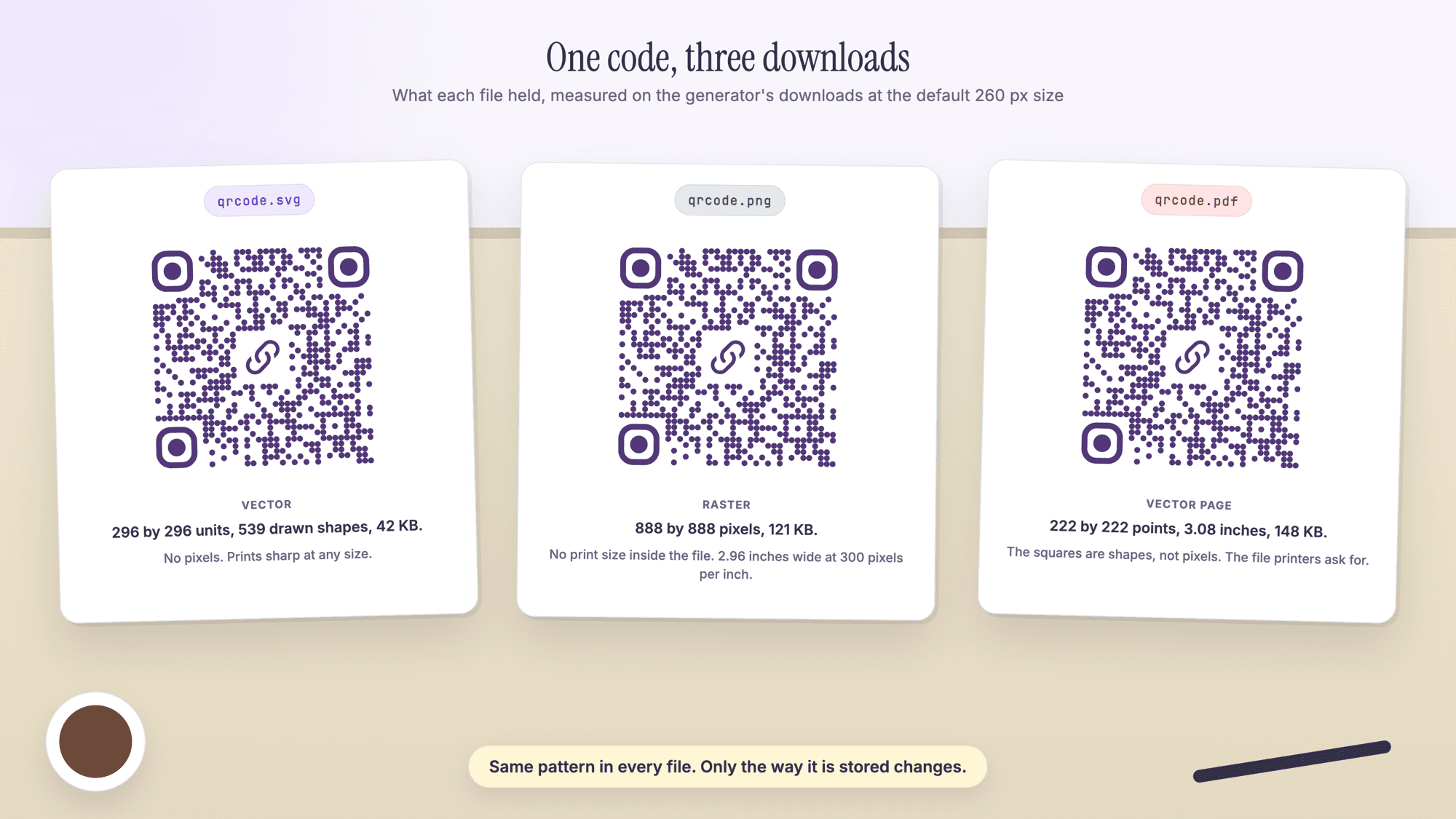
Every generator page has the same three buttons under the preview: Download PNG, Download SVG and Download PDF. All three are built in the browser from one drawing of the code with a white margin added, and the export code says what each contains. On November 15, 2026 the three files for a 38 character dynamic short link (a 37 square code) and for a 117 character tagged link (57 squares) were downloaded at the default size and measured.
| Measured on November 15, 2026 | SVG | PNG | |
|---|---|---|---|
| What the squares are | 539 circles for 37 squares, 1,490 for 57 | Pixels | Vector shapes; no raster image in the file |
| Canvas | 296 by 296 units | 888 by 888 pixels | 222 by 222 points, 3.08 inches |
| Print size stored in the file | None; a vector has no fixed size | None; no physical size chunk | The page size |
| Bytes, 37 square code | 42 KB | 121 KB | 148 KB |
| Bytes, 57 square code | 93 KB | 107 KB | 386 KB |
| Background and center icon | Drawn into the file; the icon is an embedded image | Pixels | Drawn on the page |
Three things in that table matter. The generator draws the dots as circles, so its SVG is bigger than the "usually less then 20kb" one ranking page (QR Planet) gives for SVG codes; file size is not a quality signal. The PNG has no physical size inside it: the PNG specification says that when its size chunk is absent "pixels are assumed to be square, and the physical size of each pixel is unknown", so the printed width is whatever the layout program is told. And the margin drawn into all three files is about 2.6 squares for a 37 square code, where the specification asks for four; leave extra white space, as the guide to how big a QR code should be explains.
The size slider under Show more options runs from 150 to 600 pixels in steps of 50 and changes all three files together: the SVG canvas is the slider size plus the margin, the PNG is three times that, and the PDF page is three quarters of a point per unit. The table was computed from the export code and checked against the downloaded files at the default size.
| Slider size | SVG canvas (units) | PNG (pixels) | PNG width at 300 ppi | PNG width at 150 ppi | PDF page |
|---|---|---|---|---|---|
| 150 | 172 | 516 | 1.72 in | 3.44 in | 1.79 in |
| 260 (default) | 296 | 888 | 2.96 in | 5.92 in | 3.08 in |
| 400 | 456 | 1,368 | 4.56 in | 9.12 in | 4.75 in |
| 600 | 684 | 2,052 | 6.84 in | 13.68 in | 7.13 in |
Which file for each job
The job decides the file: vector for anything printed, PNG for anything shown on a screen, and the printer's own requirements when a print shop is involved.
| Where the code goes | Download | Why |
|---|---|---|
| Business cards, flyers, menus, stickers from a print shop | PDF, or SVG if asked | Vistaprint's file guide says PDF "can preserve sharp vector artwork, embedded fonts and CMYK colors" |
| A sign, poster, banner or vehicle wrap | SVG or PDF | The code may be printed feet wide; a PNG would be stretched |
| A layout in Illustrator, InDesign, Affinity or Inkscape | SVG or PDF | Both place as editable vector shapes |
| A design in Figma | PNG at the display size, or SVG as shapes | Figma lists "JPG, PNG, HEIC, WebP, GIF, TIFF" as image types and treats an imported SVG as shapes |
| Word, PowerPoint, Outlook or Excel | SVG | Microsoft 365 supports "inserting and editing scalable vector graphics (.SVG) files" in all four |
| Google Docs or Google Slides | PNG | Google's help page says these insert "photos, videos, or .gif files"; vector files are not on the list |
| A web page, an email signature, a social post | PNG, or SVG on a web page | The display size is fixed, so pixels are enough; SVG stays sharp on high resolution screens |
| A slide on a projector or a conference screen | PNG from a larger slider setting | Read from a distance, so give it more pixels |
| The phone's photo roll | PNG | Phones save pictures; the guide to making a QR code on a phone has the steps |
How big a PNG can print
A PNG prints sharp up to its pixel width divided by the pixels per inch the print needs, and the common target is 300. The default download is 888 pixels wide, so it holds 2.96 inches at 300 pixels per inch and 5.92 inches at 150. Nothing in the file changes when it is placed larger; each square just gets fewer dots.
The 300 figure is the printers' own. Vistaprint's business card guide says "Use images at 300 DPI at their printed size and vector logos wherever possible", and settles a common question: "Changing a file's resolution label from 72 to 300 won't restore missing detail." A PNG from the generator has no label at all, so the only numbers that matter are the pixels in the file and the inches on the page. The 4over4 file guide gives the same ranking: "print-ready PDF (preferred)" first, then high resolution raster files.
For a QR code the pixel count has a second meaning: pixels per square. A 37 square code in the default PNG has 21 pixels per square; a 57 square code in the same 888 pixel file has 12. Denso Wave, the company that invented the code, recommends four printer dots per square and adds that "It is recommended that QR Code symbols be printed as large as possible within the available printing area." The QR code character limit guide shows how the content sets the square count, and the size chart of all 40 QR code versions lists the printed floor for every version.
What the scanner test showed
A clean PNG from the generator read on this site's scanner at every size and quality it was pushed to, down to 60 pixels wide and to a JPEG saved at quality 5. That is the best case, a clean file uploaded straight to the QR code scanner page, and it still shows where the real risks are.
On November 15, 2026 the downloaded 888 pixel PNG of the 37 square code was scaled to 296, 148, 111, 74 and 60 pixels, enlarged to 3,552 pixels with no smoothing, and saved as JPEG at quality 75, 30, 10 and 5 (123 KB down to 24 KB). Every file read, and so did the downloaded SVG and the 57 square tagged PNG. At 60 pixels each square was under two pixels wide, the floor measured in the size guide's screen test.
What the test does not show is a phone. A camera adds blur, glare, angle and the paper's texture, and a screen adds its own pixel grid. The two findings to carry: JPEG compression does not break a clean code on its own, and small pixel counts do not either. What breaks codes in print is a PNG stretched until each square is a soft blur, a margin cropped away, or a screenshot of a screenshot. The fixes for a QR code that does not scan are listed by symptom, and how to test a QR code before it is printed has the proof routine for a real phone and a real print.
Sending the file to a print shop
Send the PDF unless the shop asks for something else, place it in the shop's template at the final size, and keep white space around it. PDF/X is the print version of the standard, and Vistaprint names it: "PDF/X-1a is an established print standard; use it when requested."
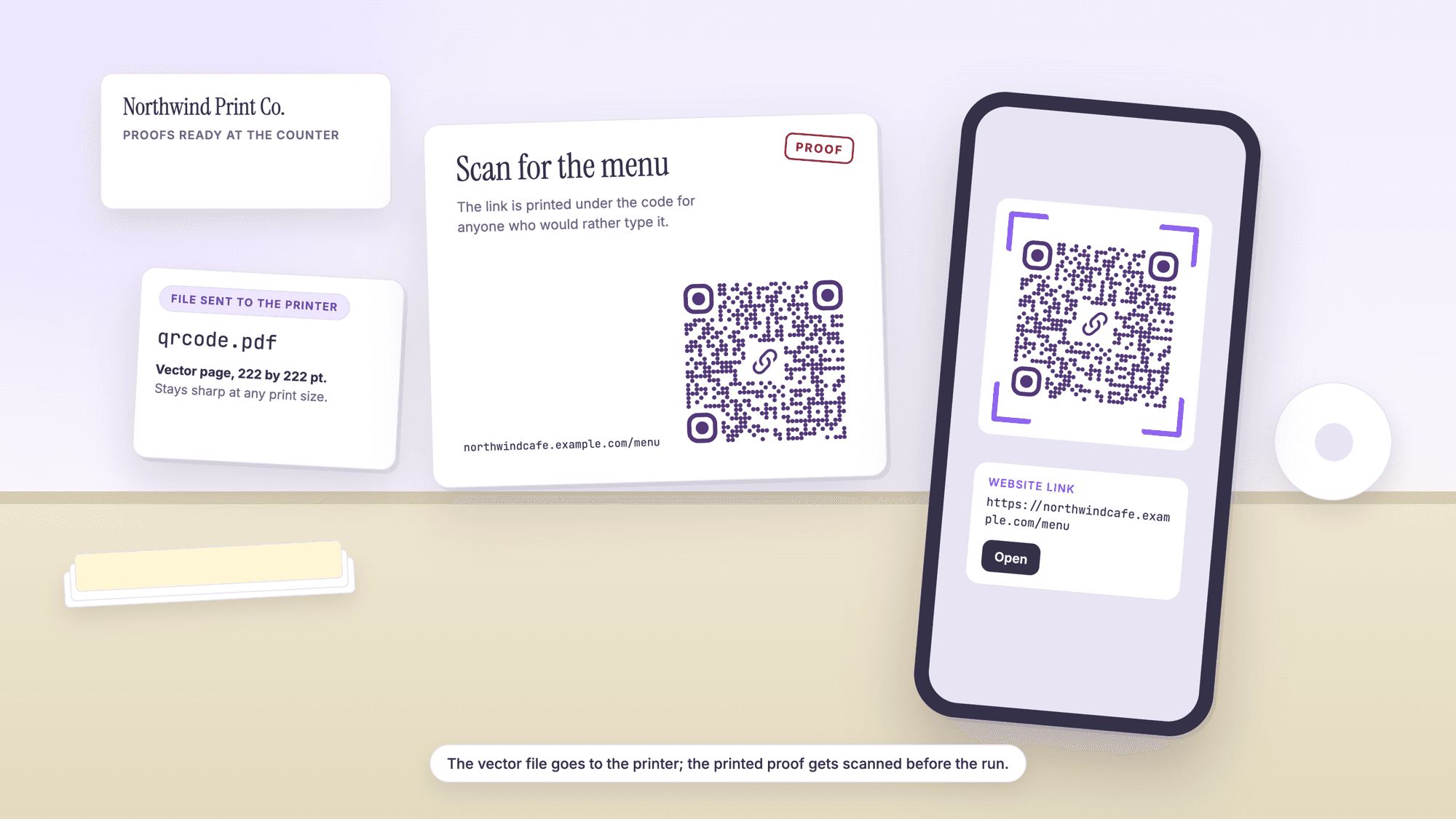
The generator's PDF is a page the size of the code, 3.08 inches at the default setting, and nothing else. So the workflow is: open the shop's template or your own layout in Illustrator, InDesign, Affinity or a similar program, place the PDF or the SVG where the code goes, scale it to the printed width from the size guide, and export the whole layout as the press PDF the shop wants. For a business card the code sits on the back at about 1 inch; the business card QR code layout guide has the layout and the vCard QR code page makes a contact card code with the same three download buttons. For a flyer or mailer, the QR codes for print marketing campaigns guide covers the tagged link and the dynamic code that lets the destination change after printing.
Making the code and downloading the right file
The download takes four steps on any generator page. For a web address that is the URL QR code page; the homepage lists the other eleven content types.
1. Open the page for the content type and paste the content; the guide to creating a QR code for a URL covers a tagged link. The code redraws as you type, at error correction level H, the highest.
2. Open Show more options if the file is for a screen or a large print and move the size slider; 260 pixels is the default and 600 is the top, a 2,052 pixel PNG. Keep the squares dark on a light background.
3. Click Download SVG or Download PDF for print, Download PNG for screens. The three files hold the same code. Static codes are unlimited and free with no account on the QR code generator that needs no sign-up, and the file is built in your browser without the content being sent anywhere.
4. Test the file on the scanner's upload page by uploading it (PNG, JPG, WebP and GIF all work there, and the SVG read in this run's test), then print a proof and read it with a phone from where the code will live.
If the destination may change after the print run, make the code dynamic before downloading: the printed pattern then holds a short link and the destination is edited in the dashboard. The dynamic QR code generator makes one, and every free account includes 10 dynamic QR codes, free for life, with scan analytics, no credit card required, no watermarks, and no ads on the site or on the redirect. Static and dynamic QR codes compared has the trade-offs.
Common mistakes with QR code files
Stretching a PNG to fill a sign. The default PNG holds 2.96 inches at 300 pixels per inch. Placed at 12 inches it is at 74 pixels per inch, and each square is a soft block. Use the SVG or the PDF for anything wider than about 3 inches.
Sending a screenshot to the printer. A screenshot is a PNG of whatever was on the screen, often with the margin cut and the code at the screen's scale. Use the download buttons; the file they make carries the margin and the full pattern.
Saving the master as a JPEG. It read in the test, but every edit and re-save discards more detail. Keep the SVG as the master and make a PNG from it when a screen needs one.
Cropping the margin to fit. The downloaded files carry about 2.6 squares of white for a 37 square code; the specification asks for four. Add white space rather than trimming it.
Picking the format before the size. No file format rescues a code printed too small for its reading distance; the size guide comes first, the file second.
Sources
- PNG Specification 1.2, Introduction (libpng.org)
- PNG Specification 1.2, Chunk Specifications, pHYs (libpng.org)
- MDN Web Docs: SVG, Scalable Vector Graphics
- Adobe: What is a PDF? Portable Document Format
- JPEG committee: JPEG 1 overview
- Denso Wave: Point for setting the module size
- Denso Wave: Point for determining the code area
- Microsoft Support: Edit SVG images in Microsoft 365
- Google Docs Editors Help: Insert or delete images and videos
- Figma Help: Add images and videos to designs
- Vistaprint: Prepare business card print files
- 4over4: What file types do you accept?
- Uniqode: Vector QR Codes Explained (read November 15, 2026)
- QR Planet: Rendering QR Codes in PDF versus EPS format (read November 15, 2026)
Common questions about QR code file formats
Should I download a QR code as PNG or SVG?▾
SVG for anything that will be printed or might be resized, PNG for screens. The SVG stores the squares as shapes and prints sharp at any size; the generator's PNG is 888 by 888 pixels at the default setting, sharp on a screen and in print up to about 3 inches wide. When in doubt, download both; they hold the same code.
What is the best file format for printing a QR code?▾
A vector file: PDF or SVG. The two printers' file guides read for this page put PDF first, and Vistaprint's says PDF preserves sharp vector artwork. The generator's PDF is a page the size of the code with the squares as vector shapes, so it can be placed in a layout at any width. Use SVG when the layout program or the printer prefers it.
Can I print a PNG QR code, and how big?▾
Yes, up to its pixel width divided by 300. The default 888 pixel PNG prints sharp to 2.96 inches at 300 pixels per inch, or 5.92 inches at 150. The slider under Show more options goes up to 600, a 2,052 pixel PNG good for 6.84 inches. For anything larger, use the SVG or the PDF.
Does a QR code need to be 300 dpi?▾
The file does not carry a dpi: the generator's PNG has no physical size inside it, and the PNG specification says the physical size is then unknown. What matters is pixels divided by printed inches, and 300 is the figure printers such as Vistaprint ask for. A vector file has no dpi question at all.
Can a QR code be a JPG?▾
It can scan: in this page's test a clean JPEG saved at quality 5 still read on the site's scanner. But JPEG discards detail at every save, so it should never be the master copy, and a JPEG of a stretched or screenshotted code carries those problems too. Keep the SVG and make a PNG for screens.
How do I convert a PNG QR code to SVG?▾
Make the code again from the same content and download the SVG. Tracing pixels into shapes is unreliable and unnecessary, because the same content at the same error correction level gives the same pattern in the same generator. For a dynamic code, open it in the dashboard and download the SVG there, so the short link inside stays the same.
What file format does a print shop want for a QR code?▾
Usually a print-ready PDF of the whole layout, with the code placed as vector artwork. Place the generator's PDF or SVG in the layout at the final width, keep four squares of white around it, and export the layout as the PDF the shop specifies, PDF/X-1a when requested. If the shop asks for EPS, ask whether the PDF works; it holds the same shapes.
Three downloads under every preview, built in your browser. Static QR codes are unlimited and free with no account. Every free account includes 10 dynamic QR codes, free for life, with scan analytics. No credit card, no watermarks, no ads.
Make a QR code and download SVG, PNG or PDFPublished by
QRCodePrime Team
Guides on making, printing and scanning QR codes
Published by the team behind the free QRCodePrime generator and scanner. The example codes in our illustrations are real codes made with the generator, numbers are either computed by us or quoted from a source we name, and the sources are linked at the end of each article. Found a mistake? Email hello@qrcodeprime.com and we will fix it.